How Automated Alerts Help Improve Retail Floor Staff Efficiency
Modern retail management systems can use automated alerts to identify changes, exceptions and upcoming requirements and bring them to the attention of the appropriate employee or manager.

Retail floor employees have a lot competing for their attention.
Customers need assistance. Shipments arrive. Products need replenishment. Promotions change. Tasks have deadlines. Managers communicate new priorities. Store conditions can change throughout the day.
The challenge is not simply making sure employees have a list of everything they need to do.
It is helping them understand what requires their attention right now.
Modern retail management systems can use automated alerts to identify changes, exceptions and upcoming requirements and bring them to the attention of the appropriate employee or manager.
When used effectively, these alerts can reduce the time between something happening and someone taking action.
Instead of relying on an employee or manager to constantly check different systems for updates, the system can help surface the information that requires attention.
The goal is not to create more notifications.
It is to make it easier for frontline teams to recognize what matters, respond faster and spend less time figuring out what to do next.
Take control of your store performance
Book a demo with StoreForce today and run your retail operations better tomorrow.
Book A Demo
What Are Automated Alerts in Retail Management Systems?
Automated alerts are notifications generated when a predefined event, condition or requirement occurs.
Rather than waiting for someone to manually identify an issue and communicate it to the store, the system can bring the information to the appropriate person.
For example, an alert might indicate that:
A task has been assigned
A deadline is approaching
An important activity remains incomplete
An employee has an attendance issue
A store requires follow-up
A performance metric requires attention
A workflow has reached its next step
Different retail management systems use alerts differently depending on the information and workflows they manage.
A task management platform may primarily generate alerts around assignments and completion.
A workforce management platform may surface scheduling or attendance exceptions.
A performance management system may bring unusual KPI results to a manager's attention.
An integrated retail platform can connect more of those signals with the operational workflows employees and managers use throughout the day.
How Do Different Retail Management Systems Use Automated Alerts?
Automated alerts can serve different purposes depending on the system generating them.
The important distinction is not simply whether a system sends notifications, but what information triggers those notifications and what employees can do with them.
Here are some of the most common ways retail systems can use automated alerts to improve frontline efficiency.
1. Task and Workflow Alerts Help Employees Prioritize Work
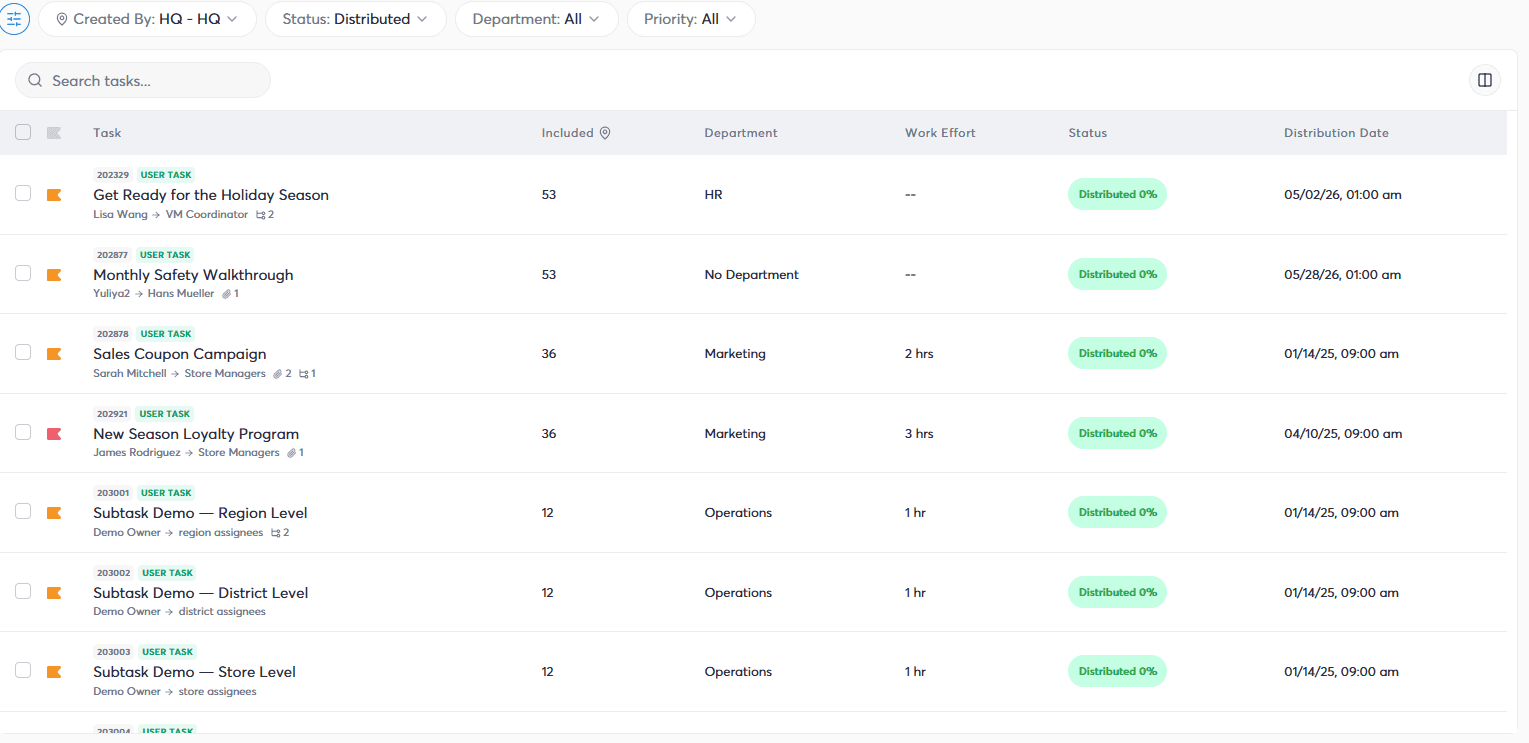
Task management systems can use alerts to keep store employees informed about the work they are responsible for completing.
Instead of requiring employees to repeatedly check a task list, notifications can bring new or changing priorities to their attention.
That can include alerts when a task is assigned, updated or approaching its deadline.
This becomes particularly useful when store priorities change throughout the day.
An employee may begin a shift with several routine activities planned. Head office may then launch an urgent initiative that needs to be completed before the end of the day.
A digital task system can communicate that change directly rather than relying on a chain of emails, phone calls or verbal instructions.
Employees get greater clarity around what needs to happen, while managers have greater visibility into whether the work was completed.
2. Workforce and Attendance Alerts Help Managers Focus on Exceptions
Workforce management systems can use alerts to bring scheduling and attendance issues to a manager's attention.
For example, an employee may miss a scheduled punch or an attendance issue may require review.
Without automated visibility, managers may need to continually monitor workforce information themselves.
Alerts can change that process.
Instead of checking every employee to make sure everything is proceeding as expected, managers can focus more of their attention on the exceptions that actually require action.
This is an important efficiency principle.
Managers should not have to spend their time searching for problems a system can identify for them.
Automated alerts can surface those exceptions so managers can investigate and determine what needs to happen next.
3. Performance Alerts Can Show Managers Where Attention Is Needed
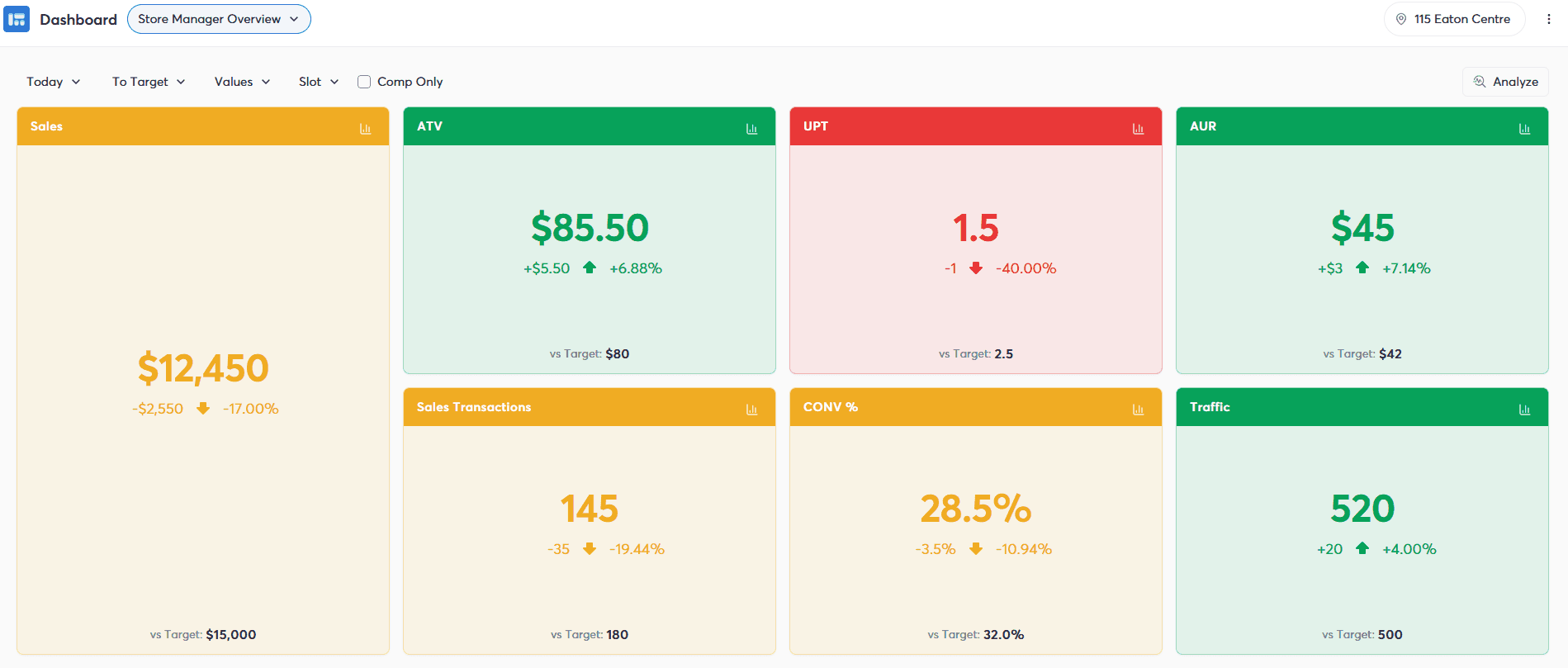
Retail performance systems can monitor KPIs such as sales, traffic, conversion, average transaction value or units per transaction.
The challenge is that store managers cannot spend their entire day watching dashboards.
They are also responsible for employees, customers and store operations.
Automated performance alerts can help surface meaningful changes or exceptions that may require investigation.
For example, strong traffic combined with weaker-than-expected conversion could indicate an opportunity for the manager to look more closely at what is happening on the floor.
The alert itself does not explain the entire situation.
It provides a signal:
Something may require your attention.
The manager can then investigate the context and decide whether action is necessary.
That makes performance information more useful because managers do not have to constantly search for the moments when it matters.
4. Customer Demand Alerts Can Help Teams Respond to Changing Conditions
Customer demand can change throughout the day.
Stores may experience unexpected increases in traffic or periods that are significantly quieter than anticipated.
When retail systems have access to relevant demand information, automated signals can help managers recognize changing store conditions.
That can influence how employees are deployed and what work should take priority.
During a busy period, customer-facing activities may require more attention.
When demand slows, employees may have greater capacity to complete operational tasks.
The important benefit is responsiveness.
A workforce plan may establish what employees are expected to do throughout the day, but real-world conditions do not always follow the plan.
Real-time signals can help managers adjust priorities as conditions change.
5. Operational Alerts Can Turn Business Events Into Store Actions
Some of the most useful automated workflows begin with something happening elsewhere in the business.
A promotion changes.
An operational requirement is triggered.
A particular condition requires stores to complete an activity.
Without connected systems, someone may need to identify that event, determine which stores are affected, communicate instructions and follow up on execution.
Automation can shorten that process. A business event can trigger a task or workflow for the appropriate stores, roles or employees. That changes the process from:
Something happens → someone notices → someone communicates it → a manager interprets it → work gets assigned → someone follows up
to something closer to:
Something happens → the system triggers the appropriate work → the relevant team is notified → the work is completed → execution is visible
For retailers operating across many locations, removing those manual handoffs can create significant efficiencies.
When Do Automated Alerts Actually Improve Staff Efficiency?
Automated alerts are only useful when they help employees make better decisions.
More notifications do not automatically create a more efficient store.
In fact, too many alerts can have the opposite effect.
If employees receive constant notifications, everything begins to look equally important. Critical information can become buried among routine updates, and employees may begin ignoring notifications altogether.
This is commonly referred to as alert or notification fatigue.
Effective retail alerts therefore need context.
They should help answer questions such as:
Who actually needs this information?
Does something require action?
How important is it?
When does it need to happen?
What should the employee do next?
The best alert is not necessarily the one that arrives fastest. It is the one that reaches the right person at the right time with enough information to take the appropriate action.
Why Are Role- and Location-Based Alerts Important in Retail?
Not every employee needs every update.
A store associate in Toronto does not necessarily need to know about an operational issue affecting a store in Vancouver.
A cashier may not need the same information as a store manager.
A district leader may need visibility across multiple locations without receiving every individual task notification generated inside those stores.
Retail management systems can make communication more useful by targeting information according to factors such as location and role.
This reduces unnecessary noise.
Instead of broadcasting every message across the organization, retailers can deliver relevant information to the people responsible for acting on it.
That becomes increasingly important as organizations scale.
A notification strategy that works for five stores can quickly become overwhelming across hundreds or thousands of locations.
How Do Integrated Retail Systems Make Automated Alerts More Useful?
The usefulness of an automated alert depends heavily on the context available to the system generating it.
A standalone task application understands tasks.
A scheduling application understands schedules.
A performance platform understands KPIs.
Each can generate useful alerts within its own area.
Integrated retail systems can connect more of those operational signals.
That makes it possible to create a more connected flow between what is happening in the business and what employees need to do about it.
Instead of treating communication, tasks, workforce information and performance as completely separate activities, retailers can create workflows where information leads more directly to action.
The basic model becomes:
Signal → Alert → Priority → Action → Completion → Visibility
That is more valuable than an alert existing on its own.
The notification becomes part of an operational workflow.
How Does StoreForce Help Retailers Turn Alerts Into Action?
StoreForce connects task management, workforce management, team communications and store performance visibility within a platform built for retail.
Retailers can create and assign tasks to specific roles and locations, establish priorities and due dates, and monitor completion across stores.
Tasks can also be incorporated into structured workflows so operational requirements are communicated clearly and execution remains visible.
StoreForce's broader workforce capabilities provide additional context around those activities.
Scheduling and labor information help retailers understand who is working and when. Time and attendance provides visibility into workforce exceptions. Store Performance Monitoring helps leaders understand how locations are performing.
Connecting those areas can reduce the distance between identifying something that requires attention and getting that information to the people responsible for acting on it.
For frontline employees, that can mean clearer priorities.
For store managers, it can mean spending less time searching for exceptions and manually coordinating work.
For regional and head-office leaders, it can provide greater visibility into whether required activities are actually happening across stores.
The objective is not to send more alerts.
It is to create a shorter, clearer path from information to frontline action.
When automated alerts accomplish that, technology can take on more of the work involved in identifying and communicating what requires attention, while employees spend more of their time actually responding to it.

See How StoreForce Can Work for Your Stores
See how StoreForce brings employee scheduling, labor optimization, task management, and store execution together in one retail workforce management platform. Book a demo today to see what StoreForce can do for your teams.
Speak To A Retail Expert


