Spreadsheets vs. Software for Tracking Retail Productivity
Compare spreadsheets and automated software for tracking retail labour productivity, including cost, flexibility, real-time visibility, accuracy and scalability.

Retailers can track daily labour productivity using either manual spreadsheets or automated workforce management software. Both approaches can work, but they offer very different advantages as the size and complexity of the retail operation grows.
Spreadsheets are inexpensive, familiar and highly flexible. For smaller retailers with relatively simple reporting requirements, they may provide everything the business needs.
Automated software becomes more valuable when retailers need to combine labour and performance data more frequently, monitor multiple stores, reduce manual reporting and give managers access to information while there is still time to act on it.
The trade-off is ultimately between the simplicity and flexibility of a manual process and the automation, consistency and visibility of a connected system.
What Does Tracking Retail Labour Productivity Actually Mean?
Labour productivity isn't simply about asking employees to accomplish more during every hour they work.
For retailers, it is about understanding how effectively available labour is being used to support the needs of the store.
That can require looking at labour hours alongside information such as sales, customer traffic, conversion, average transaction value (ATV), units per transaction (UPT), task execution and other operational or performance measures.
A retailer might want to understand whether labour was aligned with its busiest customer periods. Another may want to compare scheduled and actual labour against sales performance. Store managers may need to know whether teams had enough capacity to serve customers while completing operational work.
The specific measures can vary, but the underlying question is similar:
How effectively is the labour available to the store contributing to what the store needs to accomplish?
Both spreadsheets and automated software can help answer that question. The difference is how much work is required to get there.
Take control of your store's performance
Book a demo with StoreForce today and run your retail operations better tomorrow.
Book a Demo
How Do Spreadsheets and Automated Labour Productivity Software Compare?
The biggest differences tend to appear around automation, reporting speed, consistency and scale.
Factor | Manual Spreadsheets | Automated Software |
|---|---|---|
Upfront cost | Typically lower | Typically higher |
Initial setup | Quick for basic tracking | Requires configuration |
Flexibility | Highly customizable | More structured |
Manual data entry | Usually higher | Can be reduced through integrations |
Real-time visibility | More limited | Stronger |
Reporting consistency | Depends on internal processes | More standardised |
Multi-store scalability | Becomes harder as complexity grows | Designed for larger data volumes |
Drill-down reporting | Often requires manual analysis | More structured and accessible |
Error risk | Can increase with manual handling | Reduces some manual data handling |
Administrative workload | Can grow significantly with scale | More processes can be automated |
Neither approach automatically makes a retailer more productive. The question is which process gives managers the information they need without creating unnecessary work along the way.
What Are the Benefits of Using Spreadsheets to Track Labour Productivity?
Spreadsheets remain common in retail for good reasons.
They're accessible. Many managers already understand how to use them, and businesses may already have spreadsheet software available throughout the organisation.
A retailer can also create a basic productivity report quickly.
If a manager wants to compare yesterday's sales against labour hours, for example, they may be able to export a few numbers, enter them into a spreadsheet and calculate the desired metric without implementing another platform.
Spreadsheets are also extremely flexible.
Retailers can build their own formulas, create custom columns and change how information is presented without being limited by a predefined reporting environment.
For a small number of stores with straightforward reporting requirements, that combination of low cost, familiarity and flexibility can be difficult to beat.
The challenge is what happens as the process grows.
How Does Manual Data Entry Affect Retail Productivity Reporting?
The spreadsheet itself may be simple. Getting all of the required information into it may not be.
Consider a retailer trying to understand daily labour productivity using several different inputs.
Labour hours may come from a time and attendance system. Sales may come from the POS. Customer traffic may live in another platform. Task completion could be tracked somewhere else.
Someone then needs to bring those numbers together.
That might involve downloading reports, copying information, entering data manually or combining multiple exports before the retailer can begin analysing performance.
Doing that for one store may be manageable.
Doing it every day across dozens or hundreds of stores creates a very different administrative burden.
Automated software can reduce some of these manual handoffs by bringing workforce and store information together or connecting with the systems where that information already exists.
The advantage isn't simply having another dashboard. It's reducing the amount of work required before managers can get to the information they actually need.
What Is the Trade-Off Between Spreadsheet Flexibility and Reporting Consistency?
One of the biggest strengths of spreadsheets can eventually become one of their weaknesses.
They can be changed easily.
A manager can add a column, modify a formula or create a different way of calculating a metric whenever they want.
That flexibility is useful when a retailer is experimenting with reporting or has a small number of people managing the process.
As the organisation grows, however, unrestricted flexibility can create inconsistencies.
One store may calculate productivity differently from another. A manager may accidentally modify a formula. Different versions of the same report may circulate throughout the business.
The retailer can solve many of these issues through strong spreadsheet governance, templates and controls.
But maintaining those controls becomes another process the organisation has to manage.
Automated software generally provides a more structured reporting environment. Retailers give up some of the unrestricted customisation of a spreadsheet in exchange for greater consistency in how information is captured and presented across the business.
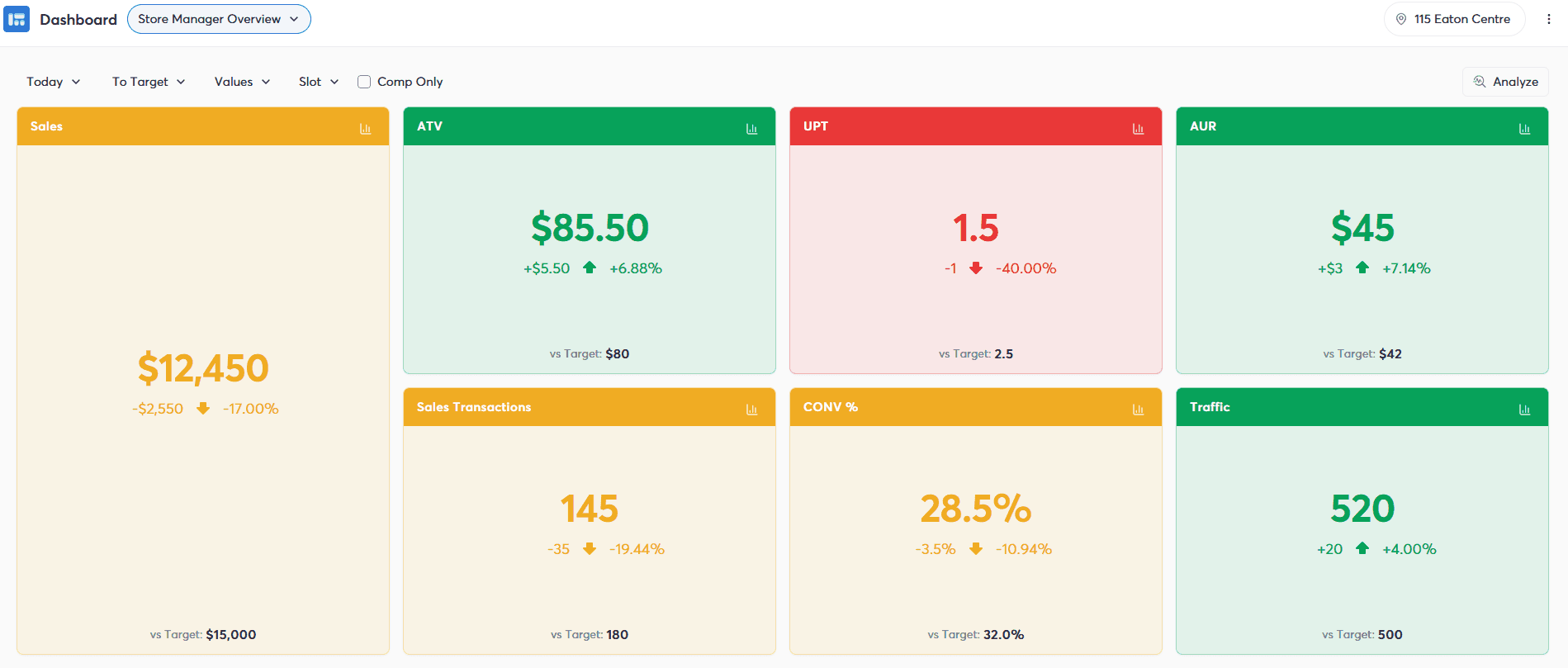
How Does Automated Software Improve Daily Productivity Visibility?
Timing is one of the biggest differences between manual and automated reporting. A spreadsheet can be very effective at answering:
“How did the store perform yesterday?”
But daily retail operations often benefit from another question:
“How is the store performing today?”
If managers have access to current workforce and performance information, they may be able to identify developing issues while there is still time to respond. Suppose customer traffic is strong but conversion is behind expectations during an important selling period. Finding that out tomorrow gives the manager information for the future. Seeing it while the store is still operating gives the manager an opportunity to investigate what is happening today.
The same principle applies to labour.
Managers can look at workforce coverage, attendance and store performance together to better understand what is happening on the floor. The value of real-time information isn't simply seeing the numbers sooner. It's having enough time to do something with them.
How Granular Can Retail Labour Productivity Reporting Get?
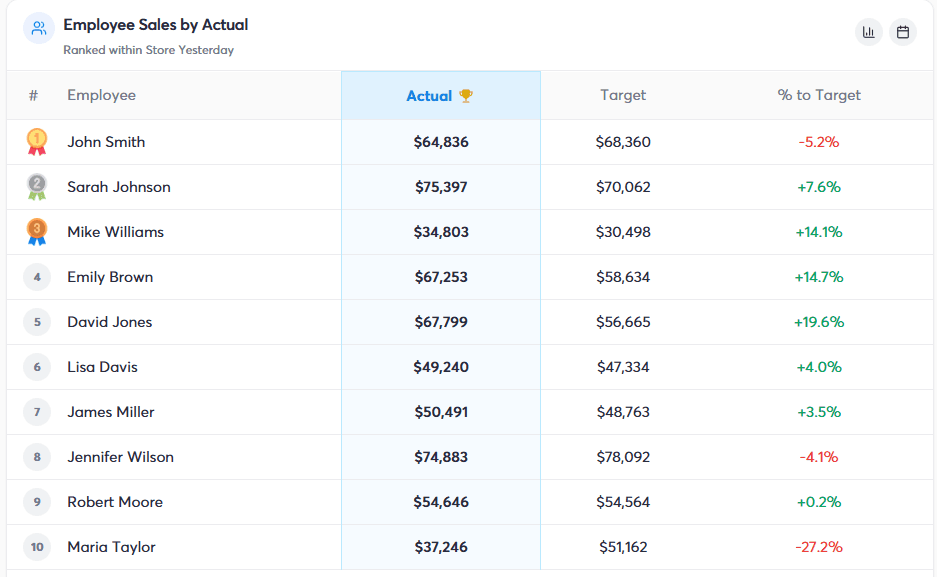
Both spreadsheets and automated software can theoretically provide extremely detailed analysis. The difference is often how much work is required to get there. A retailer may want to move through several layers of information:
Company → Region → District → Store → Team or Employee → KPI → Time Period
Building that analysis manually may require multiple spreadsheets, formulas, filters or reports. Automated software can make those relationships easier to navigate. That matters because high-level productivity numbers don't always explain where an opportunity exists. Knowing that labour productivity is below expectations across the business gives leadership a signal.
Being able to identify the region, stores, periods or performance measures contributing to that result gives managers something more useful to investigate.
The more granular reporting becomes, the more important it is that managers can access the information without spending significant time manually creating the analysis.
How Do Spreadsheets Affect Manager Administration?
The low financial cost of spreadsheets can make them appear inexpensive. But software cost isn't the only cost retailers should consider. There is also the time required to maintain the process.
How long do managers spend collecting data? Who updates the reports? How often do formulas need to be checked? How much time does head office spend combining reports from different locations? What happens when information is missing or an incorrect version gets circulated?
A process that takes one manager 20 minutes may not appear particularly burdensome.
Multiply that process across dozens of managers, hundreds of reporting periods and an entire year, and the administrative cost becomes more significant.
That doesn't automatically mean automation will be cheaper.
It means retailers should evaluate the total operational cost of their reporting process rather than comparing only the price of spreadsheet software against the subscription price of another platform.
How Does Business Growth Affect Spreadsheet-Based Reporting?
Spreadsheets don't suddenly stop working when a retailer reaches a particular number of stores. What changes is the amount of coordination required to keep the process working. A spreadsheet used by five locations may be relatively easy to maintain. As more stores are added, the retailer may have more managers submitting information, more data to validate, more reports to combine and more opportunities for processes to become inconsistent.
The business can continue adding spreadsheets, templates and controls to manage that growth. Eventually, however, the reporting process itself can become a significant operational task.
Automated software is generally better suited to situations where large amounts of workforce and performance information need to be collected, standardised and analysed repeatedly across many locations.
The tipping point is different for every retailer. It usually isn't defined by store count alone.
When Should Retailers Move Beyond Spreadsheets?
Retailers should consider moving beyond spreadsheet-based productivity tracking when the manual process begins limiting the usefulness of the information.
One warning sign is reporting speed. If it takes so long to collect and consolidate information that managers can't act on it until well after the fact, automation may provide greater value.
Consistency is another.
If different stores are calculating the same metrics differently, leadership may struggle to trust comparisons across the business.
Other signs can include managers spending increasing amounts of time maintaining reports, frequent spreadsheet errors, difficulty combining information from multiple systems and limited ability to drill into performance without manually rebuilding the analysis.
The question isn't:
“Are spreadsheets capable of doing this?”
In many cases, they are.
The better question is:
“Is the amount of manual work required to keep doing this still appropriate for our business?”
Can Automated Software Completely Replace Manager Analysis?
Automation should reduce manual reporting, not eliminate management judgment. A productivity metric can show that something deserves attention. It doesn't always explain why it happened.
A store may have weaker sales relative to labour because customer traffic was lower than expected. Conversion may decline during a particular period because the store was unusually busy. Employees may spend part of a shift completing a major shipment or promotional change rather than focusing entirely on selling activity.
Managers still need to understand the context behind the numbers. Automated software can make information easier to access and analyse, but the objective isn't to have a system automatically judge whether employees or stores were productive. It is to give managers better information for making those decisions themselves.
Why Should Labour Data Be Viewed Alongside Store Performance?
Labour hours in isolation provide limited information. Knowing that a store used 120 labour hours tells the retailer how much labour was consumed. It doesn't explain what happened during those hours.
Combining workforce information with store performance can provide much more context.
What was customer traffic? How much did the store sell? How did conversion perform? Were important operational tasks completed? Did the store have appropriate coverage during its busiest periods?
These relationships help retailers move beyond simply monitoring labour costs toward understanding how labour is being used.
That can support better scheduling, coaching and workforce planning decisions.
How Does StoreForce Help Retailers Track Labour Productivity?
StoreForce brings several areas of retail workforce and store performance management together in one platform.
Time and Attendance provides retailers with visibility into scheduled and actual labour. Labour Optimisation and Intelligent Scheduling help retailers align workforce coverage with expected store demand. Store Performance Monitoring provides visibility into retail KPIs such as sales, traffic, conversion, average transaction value and units per transaction.
Task Management can provide additional context around the operational work stores are responsible for completing.
Bringing those areas together can reduce the need for retailers to manually combine workforce and performance information in spreadsheets before they can begin understanding what happened.
The objective isn't simply to replace a spreadsheet with a dashboard.
It's to create a more connected view of:
Labour → Store activity → Performance → Insight → Better workforce decisions
Spreadsheets aren't inherently the wrong way to track retail labour productivity.
For smaller operations or relatively simple reporting requirements, their flexibility, accessibility and low cost can make them an effective option.
The trade-off changes as reporting becomes more frequent, more granular and more operationally important.
At that point, automation becomes increasingly valuable—not because spreadsheets stop being capable, but because the retailer may have outgrown the manual process required to keep them useful.

See How StoreForce Can Work for Your Stores
See how StoreForce brings employee scheduling, labour optimisation, task management, and store execution together in one retail workforce management platform. Book a demo today to see what StoreForce can do for your teams.
Speak To A Retail Expert

