Choosing Workforce Management Software for Large Retail Chains
Learn how to choose workforce management software for large retail chains, from scheduling and labour optimisation to task execution and performance.

Choosing workforce management software for a large retail chain requires looking beyond whether a platform can create employee schedules.
Large retailers need to coordinate labour across hundreds or thousands of employees while accounting for customer demand, employee availability, store workload, attendance, operational priorities and performance. Those requirements can also vary significantly from one location to another.
When comparing workforce management platforms, retailers should evaluate how well each system manages those connected parts of store operations at scale. That includes determining labour requirements, building schedules, managing employee availability, tracking time and attendance, coordinating store tasks and understanding performance across locations.
The goal is not simply to find software that manages employees. It is to find a platform that fits the way the retailer's entire store network operates.
Take control of your store's performance
Book a demo with StoreForce today and run your retail operations better tomorrow.
Book a Demo
Why Do Large Retail Chains Need Different Workforce Management Software?
Workforce management becomes more complicated as a retailer grows.
A manager responsible for one location may be able to rely on personal knowledge of their employees, previous schedules and their understanding of store traffic. Across hundreds of stores, that approach becomes difficult to standardise.
Every location can have different traffic patterns, operating hours, sales volumes, employee availability and operational requirements. A mall store may require its strongest coverage on Saturday afternoon, while an urban location experiences its largest rush after work. One store may have a major shipment arriving while another is preparing for a promotional launch.
Head office still needs consistent processes across those different environments.
That creates one of the central challenges of enterprise retail workforce management: standardising how workforce decisions are made without pretending every store has the same needs.
The right platform should give the organisation control and visibility while allowing individual workforce plans to reflect what is actually happening at each location.
What Should Large Retail Chains Look for in Workforce Management Software?
Feature lists can provide a useful starting point, but they should not be the entire evaluation.
Large retailers should look more closely at how the platform would handle the workforce decisions, operational workflows and performance questions their stores encounter every day.
Here are some of the most important areas to evaluate.
1. Labour Optimisation Based on Store Demand
Before creating a schedule, retailers need to understand how much labour each store requires and when it requires it.
That makes labour optimisation an important capability to evaluate.
Customer demand can vary significantly throughout the day. A store may require relatively little coverage when it opens but substantially more during its afternoon peak. Weekends, holidays, promotions and seasonal periods can create completely different demand patterns.
Workforce management software should help retailers use information such as customer traffic, sales forecasts and historical patterns to translate expected demand into labour requirements.
Retailers should also consider the level of detail available. Knowing that a store has 500 labour hours available for the week is useful, but managers still need to determine where those hours should be placed.
This is particularly important across a large store network. Small periods of overstaffing repeated across hundreds of stores can create unnecessary labour costs. Understaffing important customer periods can create a different problem by leaving stores without sufficient coverage when the sales opportunity is highest.
The objective should be to help retailers put available labour where it can have the greatest impact.
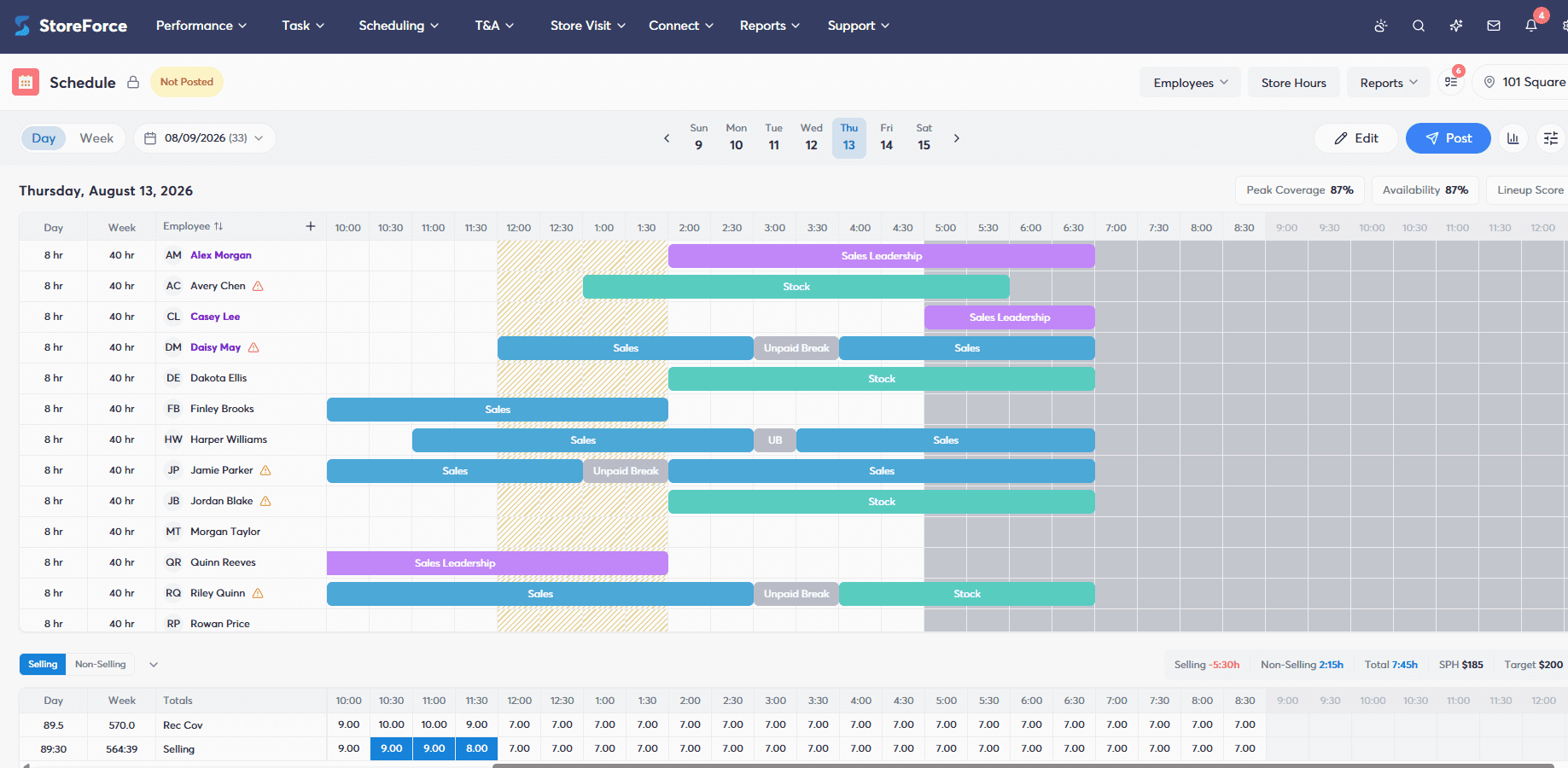
2. Employee Availability, Scheduling and Self-Service
Once a retailer understands when labour is required, the next challenge is determining which employees can provide that coverage.
Large retail workforces may include thousands of employees with different availability, roles, time-off requests and working requirements. Managers should not have to manually piece that information together every time they create a schedule.
Retailers should evaluate how employee availability feeds into schedule creation and whether the platform can use workforce requirements and availability together.
Employee self-service is another important part of the evaluation. Frontline employees should have straightforward access to relevant schedule information and the ability to participate in supported scheduling processes without every request requiring a phone call, text message or manual conversation.
This can reduce administrative work for managers while giving the scheduling process more current workforce information.
The retailer can begin with when the store needs coverage and then determine which available employees can provide it, rather than building the schedule around whoever happens to be available first.
3. Time and Attendance Visibility
Publishing the schedule establishes what is supposed to happen. Retailers still need visibility into what actually happens.
Employees may arrive late, miss punches or be absent. Actual labour use can differ from the original workforce plan.
For large retailers, manually reviewing those differences across every employee and location is unrealistic.
Workforce management software should make time and attendance exceptions easier for managers to identify and address. Retailers should also consider whether regional and head-office leaders can see broader labour and attendance patterns across their areas of responsibility.
The connection between scheduled and actual labour is particularly important when analysing store performance.
A store may have been scheduled with sufficient peak coverage, for example, but unexpected absences could mean that coverage never actually reached the floor. Without attendance context, leaders evaluating the schedule may reach the wrong conclusion about what happened.
4. Task Management and Store Execution
Workforce management should not stop at getting employees into the store.
Those employees have work to complete.
Alongside serving customers, retail teams may need to process shipments, replenish products, execute promotions, complete inventory counts, update visual displays, complete training and perform recurring operational routines.
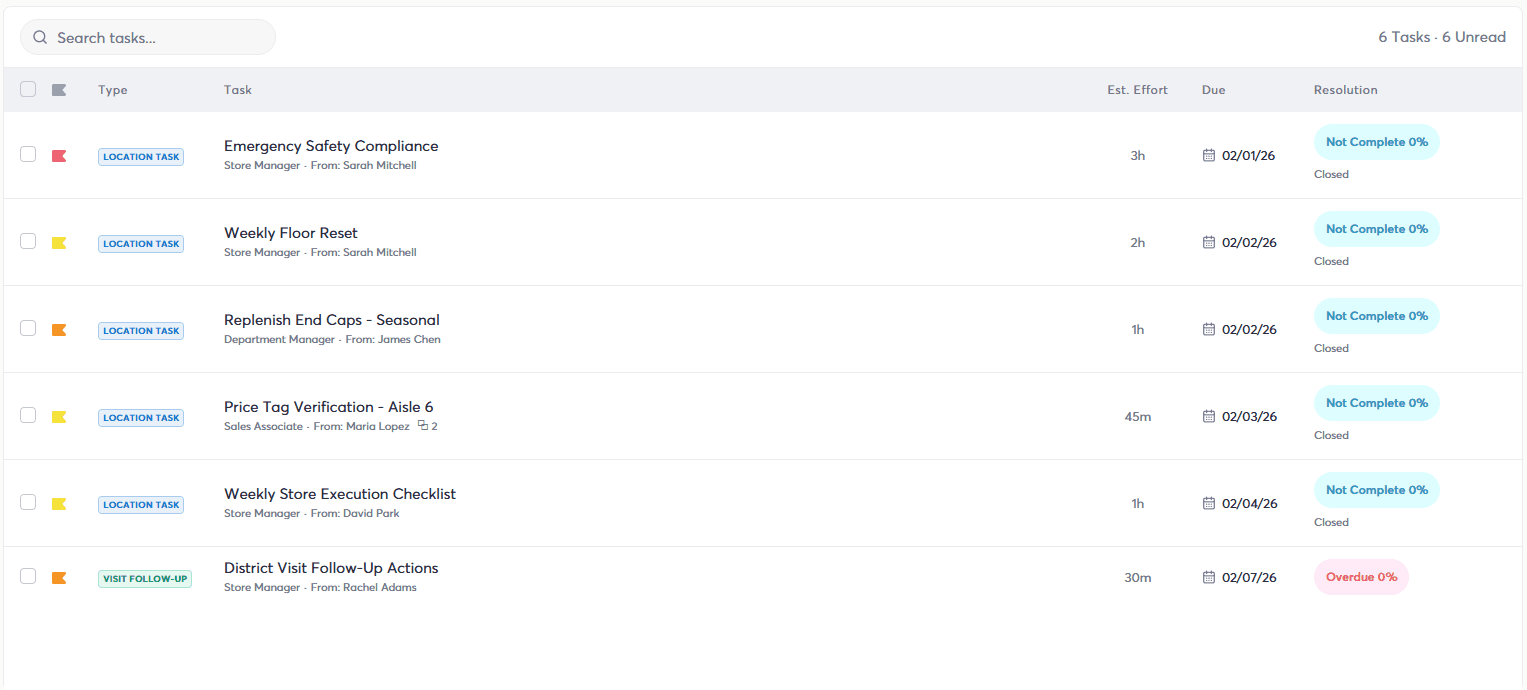
Large retailers should evaluate how workforce management software handles task management and whether store work can be connected with the workforce responsible for completing it.
Head office should be able to communicate operational priorities, assign work to the appropriate stores or roles, establish deadlines and understand whether execution is progressing across locations.
Retailers should also consider workforce capacity.
Sending 20 tasks to a store may communicate what needs to happen, but it does not answer whether employees realistically have enough time to complete those tasks while serving customers.
Connecting task management with workforce information gives retailers a better opportunity to understand both sides of the equation: the work stores need to complete and the people available to complete it.
5. Store Performance Monitoring
Workforce activity only tells part of the story. Retailers also need to understand what happened as a result.
Large retail chains should evaluate whether workforce management platforms can provide visibility into relevant store performance information, including metrics such as sales, traffic, conversion, average transaction value and units per transaction.
The value is not simply adding another dashboard.
Connecting performance with workforce information gives managers more context when investigating results.
Suppose a store experiences strong customer traffic but weaker conversion during the afternoon. Leaders can investigate whether workforce coverage was appropriate during that period, whether employees were occupied with operational work or whether the opportunity is more closely related to coaching and execution.
Likewise, high-performing stores can provide useful information. If one location consistently performs particularly well during peak periods, leaders can investigate how that store is scheduling, deploying and managing its workforce.
For large chains, the platform should allow leaders to move from a broad view of organisational performance into regions, districts and individual stores when something deserves further attention.
6. Targeted Store and Employee Communication
A large retail chain can generate an enormous amount of communication.
Not all of it is relevant to everyone.
A message intended for store managers should not necessarily reach every associate. A regional operational change does not need to interrupt employees in unaffected locations. An initiative for a particular role or department should reach the people responsible for executing it.
Retailers should evaluate whether workforce management software can target communications based on factors such as role and location.
Communication also becomes more useful when it connects directly with execution. Instead of sending an email announcing a new initiative and relying on each manager to translate that message into store-level action, the retailer can communicate the requirement alongside the work employees need to complete.
This can help reduce communication noise while making important information easier for the appropriate employees to find and act on.
7. Multi-Store and Enterprise-Level Management
Large-scale retail software needs to do more than technically support a large number of users.
It needs to reflect the structure of the retail organisation.
Store managers, district managers, regional leaders and head-office teams require different levels of access and visibility. A district manager may need to understand what is happening across 10 stores, while a regional leader needs a broader view and head office needs visibility across the entire organisation.
Retailers should evaluate how the platform handles these organisational hierarchies.
They should also look at how common processes can be established across the store network. Head office may want a consistent approach to labour planning, scheduling, task execution or communications while still allowing individual locations to operate according to local demand.
Scalability should therefore be evaluated based on how effectively the software supports the retailer's actual operating structure, not simply how many stores or employees a vendor says its technology can accommodate.
8. Integrations With Existing Retail Systems
Large retailers rarely operate their workforce management platform in isolation.
They may already have systems managing point of sale, payroll, HR, customer traffic, sales information and business intelligence. The workforce management platform needs to fit within that environment.
Retailers should identify where the information required for workforce decisions originates and where workforce information needs to go afterward.
For example, traffic and sales data may support labour planning. Employee information may originate in an HR system. Time and attendance information may eventually need to move into payroll.
The evaluation should go beyond asking whether an integration exists. Retailers should understand what information can move between systems, how frequently it is updated and how much manual intervention is still required.
A platform may technically integrate with another system while still requiring significant work from managers or administrators to reconcile information.
The real objective is to reduce the amount of manual work required to connect workforce information across the business.
9. Retail Expertise and Operating Fit
A workforce management platform can have an extensive feature set and still be the wrong fit for a particular retailer.
Retail has specific operational realities. Customer traffic changes throughout the day. Employees move between customer-facing and operational work. Peak periods represent important sales opportunities. Workload changes depending on shipments, promotions and other store activities. Locations within the same chain can have very different workforce requirements.
Retailers should therefore evaluate how well the platform reflects those realities.
One of the most useful ways to do that is to move beyond generic product demonstrations and ask vendors to work through real operating scenarios.
For example, how would the platform handle a high-traffic Saturday when a major shipment is arriving at the same time? How would a regional manager identify stores falling behind on an important initiative? How would head office communicate an urgent task only to affected stores? How would a manager determine whether they have sufficient labour available to handle customer demand and operational workload?
Those scenarios reveal much more about how a platform will operate in the real world than confirming whether a feature appears on a checklist.
Take control of your store's performance
Book a demo with StoreForce today and run your retail operations better tomorrow.
Book a Demo
Don't Compare Workforce Management Platforms by Feature Count Alone
Software evaluations can quickly become comparisons of feature lists. One platform has scheduling. Another has scheduling and time tracking. Another adds task management, communications and reporting.
Those comparisons are useful, but they do not show how well the capabilities work together.
For large retailers, connection can be just as important as capability.
Customer demand should help determine labour requirements. Labour requirements and employee availability should inform schedules. Scheduled employees need to complete customer-facing and operational work. Retailers then need to understand what happened in the store and use that information to improve future decisions.
A retailer could have separate technology supporting every stage of that process and still require managers to connect everything manually.
Traffic may live in one system, schedules in another, tasks somewhere else and performance in a separate dashboard. Each tool may work well independently while leaving managers responsible for understanding the relationship between them.
When comparing workforce management platforms, retailers should therefore ask two questions: Does the platform have the capabilities we need, and how well do those capabilities work together?
Questions to Ask When Comparing Workforce Management Software
A structured evaluation can help retailers understand how each platform would operate inside their actual store environment rather than relying entirely on feature demonstrations.
Useful questions include:
How does the platform turn customer demand into labour requirements?
Can it show when stores need additional or reduced coverage throughout the day?
How does employee availability feed into schedule creation?
What scheduling processes can employees manage themselves?
Can managers easily compare scheduled labour with actual attendance?
How does task management connect with employee schedules and workforce capacity?
Can head office assign and monitor work across stores, regions and roles?
Can managers view workforce information alongside store KPIs?
How does the platform help regional leaders identify stores requiring attention?
Can communications be targeted by location and role?
Which existing retail systems can exchange information with the platform?
How does the platform support different levels of the retail hierarchy?
Can enterprise processes be standardised while still accounting for individual store requirements?
These questions move the evaluation away from what a platform has and toward what the retailer will actually be able to do with it.
Should Large Retailers Use an Integrated Workforce Platform or Standalone Apps?
There are legitimate reasons to use specialised applications for individual workforce functions. A retailer may already have a scheduling system it likes, a separate task management application and another communication platform.
Each tool may perform its individual function effectively.
The trade-off is the amount of work required to connect them.
As the number of standalone systems grows, retailers need to determine how information will move between them and how managers will get a complete picture of what is happening.
If task management is disconnected from scheduling, for example, stores may know what work needs to happen without having visibility into whether sufficient workforce capacity exists to complete it. If store performance is separate from workforce information, managers may have to manually investigate whether coverage contributed to a particular result.
An integrated workforce management platform can reduce some of that fragmentation by bringing multiple workforce processes together.
That does not automatically make an integrated platform the right choice for every retailer. Existing technology, operational requirements, integration capabilities and the strengths of individual systems all need to be considered.
For a large retail chain, however, the operational cost of connecting multiple systems should be part of the buying decision.
Why Consider StoreForce for Large-Scale Retail Workforce Management?
StoreForce is a workforce management platform built specifically for retail, connecting labour planning, employee scheduling, store execution and performance.
Labour Optimisation helps retailers determine workforce requirements based on customer demand, while Intelligent Scheduling helps translate those requirements into employee schedules while accounting for factors such as availability and coverage. Time and Attendance provides visibility into actual workforce activity and exceptions after schedules have been published.
StoreForce also connects the workforce with the work happening inside stores. Task Management helps retailers plan, assign and track operational activities across locations, while Team Communications helps relevant information reach the appropriate stores and employees.
Store Performance Monitoring adds visibility into KPIs such as sales, traffic, conversion, average transaction value and units per transaction, helping managers and retail leaders understand what is happening across their locations.
Together, those capabilities allow retailers to connect different parts of workforce management rather than treating them as separate processes. Labour requirements inform schedules, schedules determine workforce capacity, employees execute store priorities and performance information helps leaders understand what happened.
For large retail chains evaluating workforce management software, that connection matters.
The goal is not simply to find the platform with the longest feature list. It is to find a system capable of supporting how people, labour, store work and performance come together across the retail organisation.

See How StoreForce Can Work for Your Stores
See how StoreForce brings employee scheduling, labour optimisation, task management, and store execution together in one retail workforce management platform. Book a demo today to see what StoreForce can do for your teams.
Speak To A Retail Expert


