What to Look for in a Basic App for Tracking Store Staff Hours
The best basic retail scheduling apps connect staff hours to the decisions managers make every day.

If you are looking for a basic app for tracking store staff hours, simplicity is probably high on your list. Employees need an easy way to track their time, managers need clear visibility into hours, and nobody wants another complicated system to learn.
But tracking hours is only the starting point.
The best retail staff hours apps connect those hours to the decisions managers make every day. How many hours were scheduled? How much of the labour budget is left? When will the store be busiest? What tasks need to get done? Which employees should be on the floor during peak selling hours?
A basic app should make those answers easier to find, not leave managers piecing them together from different systems.
Here is what retailers should look for when choosing an app to track store staff hours.
Start With the Basics and Make Staff Hours Easy to Track
First, the basics need to work.
Employees should be able to record their hours easily, while managers need an accurate view of the time being worked across their teams. Tracking hours should not require complicated processes or create more administrative work at the store level.
For frontline retail teams, ease of use matters. Employees may be moving between the sales floor, stockroom, and other areas throughout a shift. Managers have customers, employees, and store operations competing for their attention.
The best staff hours app should fit naturally into that environment.
If employees struggle to use it or managers spend too much time maintaining it, the app is not making time tracking simpler.
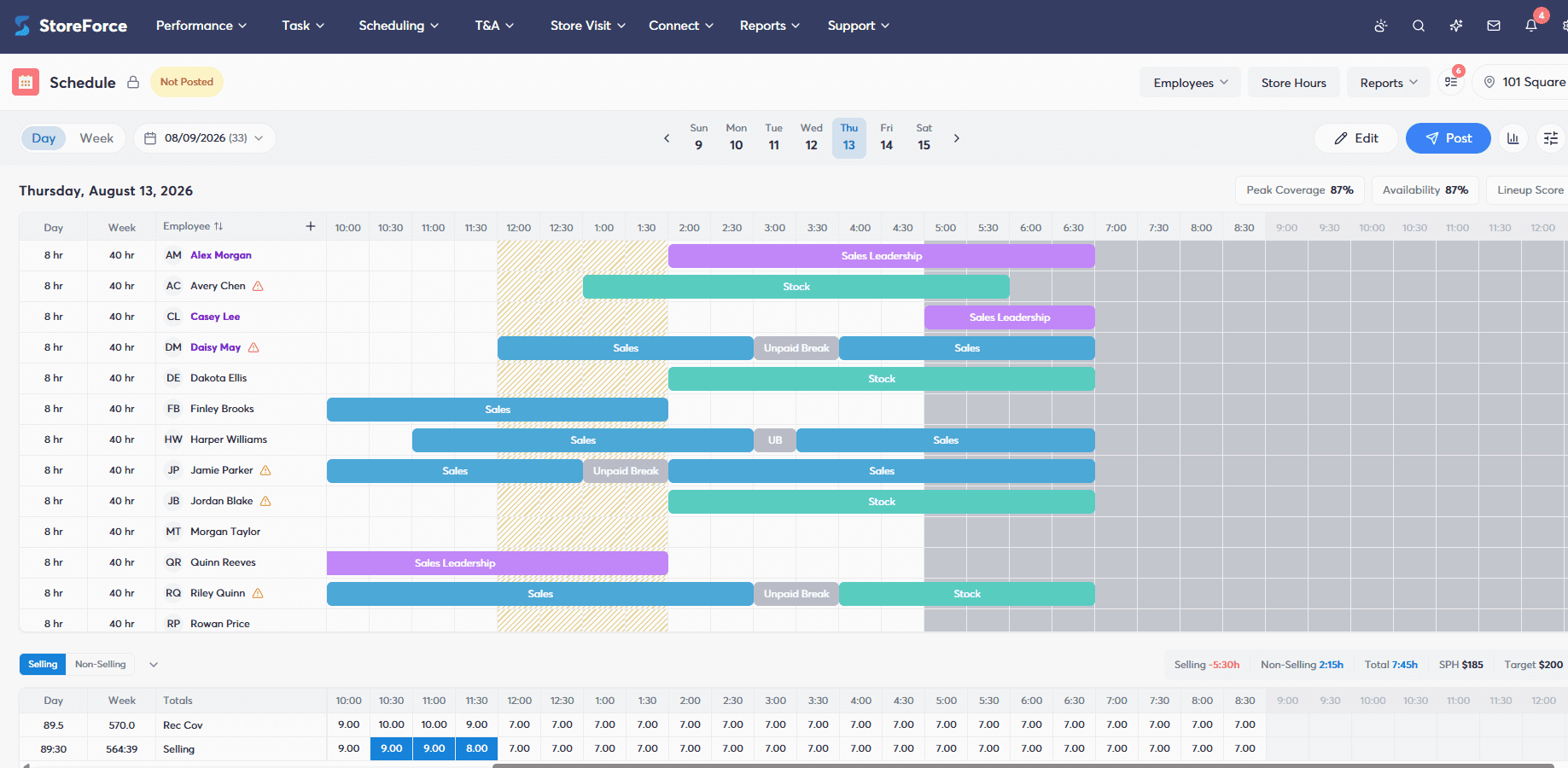
Scheduled Hours and Actual Hours Should Be Easy to Compare
Knowing that an employee worked 38 hours is useful. Knowing they were scheduled for 32 gives that number much more meaning.
A good retail workforce app should make it easy to compare scheduled hours with actual hours worked. Managers can quickly see where employees worked longer than planned, where hours were missed, and where actual labour is moving away from the schedule.
This turns time tracking into something managers can act on.
Instead of discovering at the end of the week that a store used more hours than expected, managers have better visibility into how actual hours compare with the plan.
For retailers, that is an important distinction. The goal is not simply to record hours accurately. It is to understand whether the store is using those hours as planned.
Take control of your store's performance
Book a demo with StoreForce today and run your retail operations better tomorrow.
Book a Demo
Staff Hours Should Connect Directly to the Retail Labour Budget
Every staff hour has a cost. That is why tracking hours separately from the labour budget only tells managers part of the story.
If a manager has 500 hours available for the week, they should be able to understand how the schedule uses those hours and how actual hours are tracking against that plan. As the week progresses, they need a clear picture of where labour stands without manually comparing timesheets, schedules, and spreadsheets.
Connecting staff hours with the labour budget helps managers make better decisions before a small difference becomes a larger problem.
If the store is using more labour than planned early in the week, the manager has information they can act on. If hours remain available, they can make decisions with that context too.
Tracking the hours tells you what you used. Connecting them to the budget tells you what you have left to work with.
Task Assignments Should Be Connected to the Hours Available in the Labour Plan
Retailers do not schedule employees simply to have people in the building. Those employees have work to do.
Shipments need to be processed. Displays need to change. Inventory needs to be counted. Promotions need to launch. Training, audits, price changes, and other store tasks all require employee time.
That work should have a relationship with the labour plan.
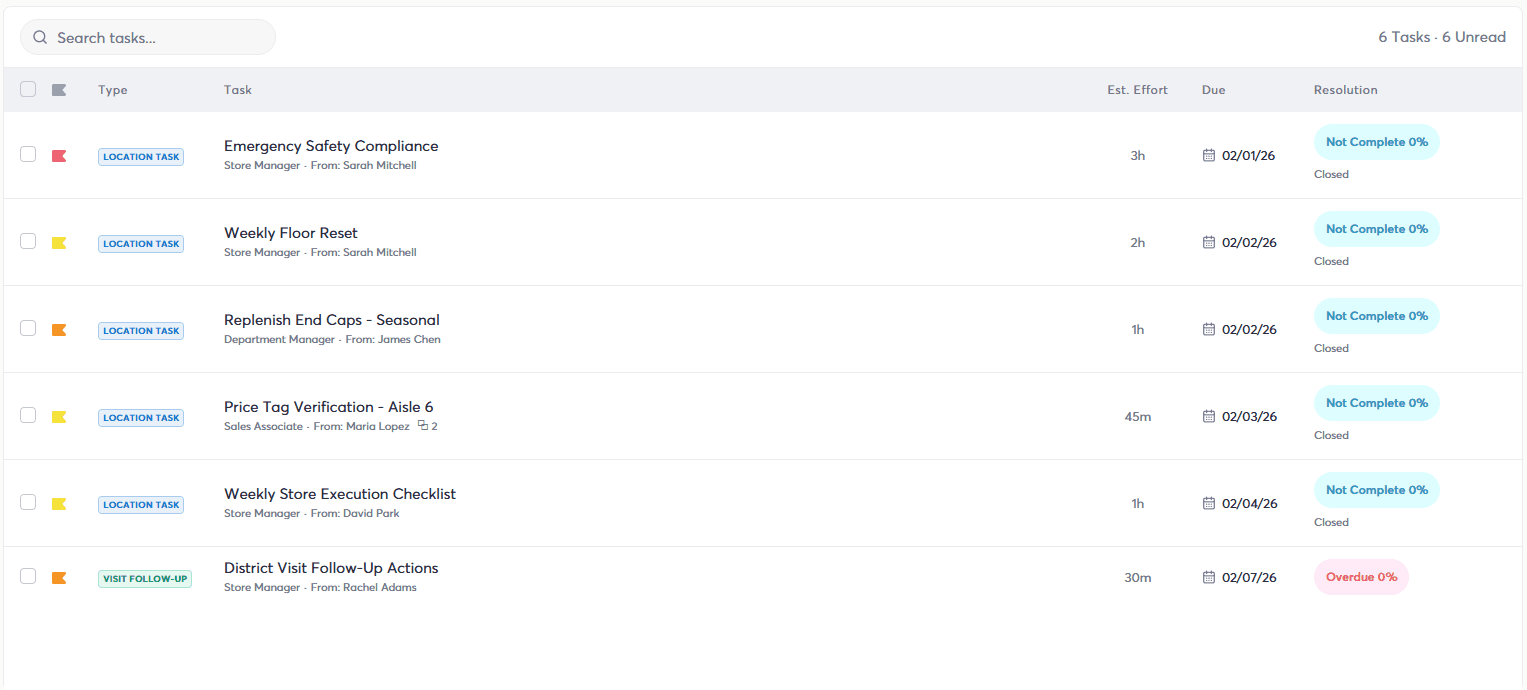
If a store has ten hours of operational tasks planned for Wednesday, those ten hours need to come from somewhere. Assigning the work without considering available labour can leave managers with a full task list and no realistic way to complete it.
When tasks, scheduling, and labour budgets are connected, managers can get a better picture of both the work that needs to happen and the hours available to support it.
A labour budget tells you how many hours you have. Task workload helps tell you what those hours need to accomplish.
That is much more useful than treating staff hours and store tasks as separate numbers.
Retail Schedules Should Reflect Traffic and Peak Selling Hours
Using the right number of staff hours does not automatically mean those hours are being used at the right time.
Retail demand changes throughout the day and week. A store may be quiet at 10 a.m. and packed at 4 p.m. Saturday may look completely different from Tuesday.
A retail workforce app should help managers connect scheduling with expected traffic and peak selling periods so labour can be placed where it has the greatest value.
If a manager has 100 hours available, simply filling 100 hours is not enough. Scheduling too many of those hours during slower periods can leave the store short when customer traffic peaks.
Connecting schedules with traffic helps retailers move beyond filling shifts and start thinking about coverage.
The question is not only how many hours you scheduled. It is whether you scheduled those hours when the store needed them most.
Better Scheduling Should Consider Employee Performance Too
When employees work matters. Who is working can matter just as much.
Retail teams are made up of people with different strengths. Some sales associates may consistently perform well on the floor. Others may be strong at operational work, customer service, visual merchandising, or other areas of the business.
When scheduling sits closer to performance data and store KPIs, managers have more information to consider when building the team for a shift.
For example, if Saturday afternoon is consistently one of the store's strongest selling periods, having high-performing sales associates available during those hours may make more sense than simply scheduling whoever is available.
The same thinking can apply to store goals. Managers can consider employee performance alongside traffic, labour budgets, and operational needs when deciding where available hours can have the greatest impact.
The Right Number of Hours Is Only Part of the Scheduling Decision
Two stores can use the same number of labour hours and get very different results.
The difference can come down to when those hours were scheduled, which employees were working, how much task workload existed, and whether staffing matched customer demand.
That is why a useful retail staff hours app should do more than count time.
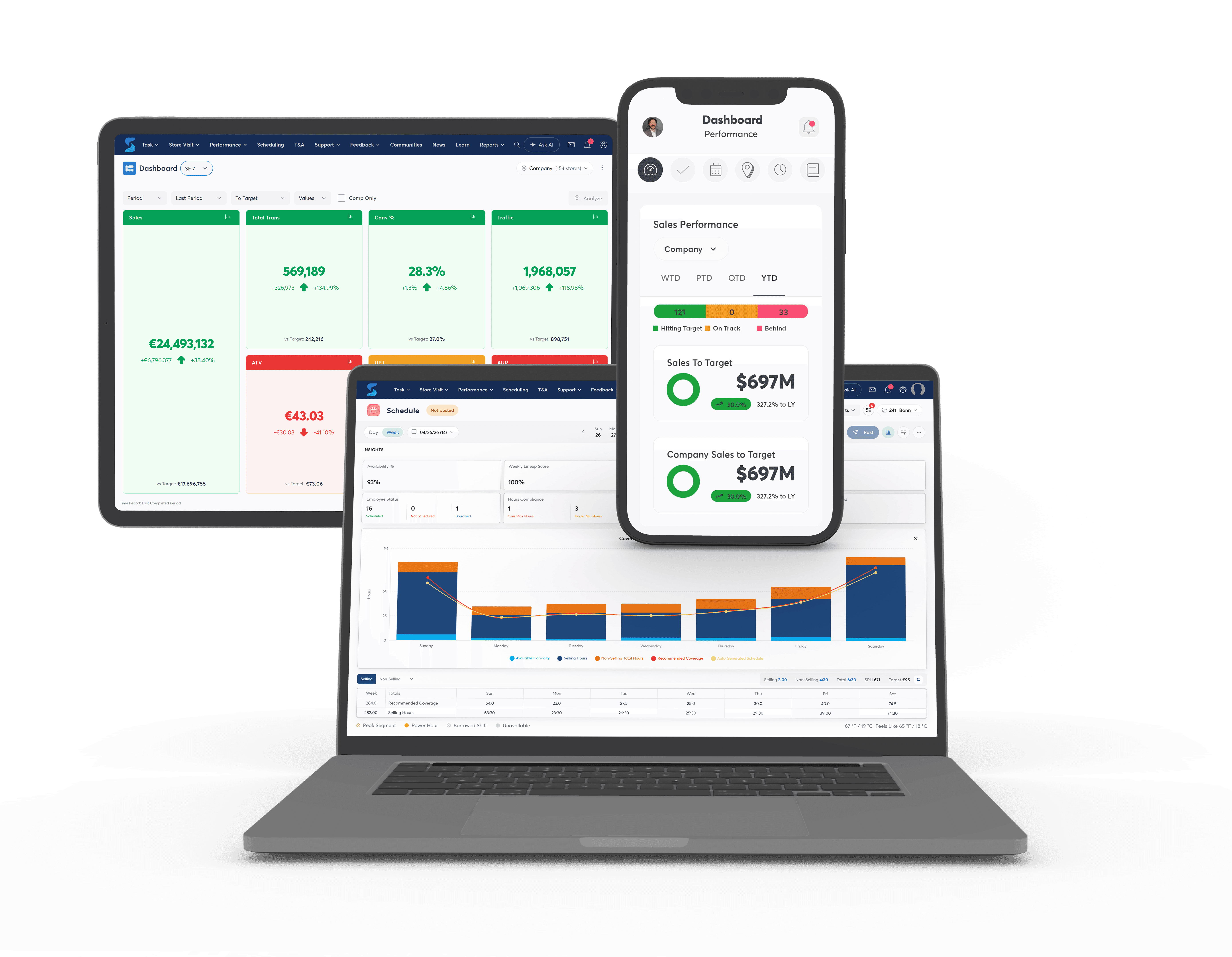
Retailers should be able to connect hours with the information that helps determine where those hours belong. The labour budget creates the boundaries, while traffic, tasks, employee strengths, and store goals help managers make better decisions within them.
Alerts Should Tell Managers When Staff Hours Need Attention
Managers should not have to constantly search for problems in their labour plan.
Useful alerts can bring important issues to their attention, such as missed punches, employees approaching overtime, attendance concerns, or actual hours moving away from what was scheduled.
The goal is simple: tell managers when something needs their attention while there is still time to do something about it.
That is especially useful in retail because schedules rarely stay completely unchanged. Employees call in sick, shifts run longer, demand changes, and unexpected work appears.
A good system helps managers keep an eye on labour without requiring them to spend the day watching a time-tracking screen.
Staff Hours and Schedules Should Be Accessible Beyond the Store
Retail employees should not have to be standing in the back office to find out when they work.
A modern staff hours app should be mobile and easy to access outside the store, giving employees a simple way to check upcoming schedules and view relevant workforce information from their own device.
That becomes especially useful when schedules change. Employees can stay connected to their work schedule without calling the store or relying on a printed schedule pinned somewhere in the back room.
For managers, mobile access can also make workforce management more practical. Retail does not always happen from behind a desk, and managers should be able to access the information they need while moving through the store or working away from a computer.
Retail teams are mobile. Their workforce tools should be too.
Take control of your store's performance
Book a demo with StoreForce today and run your retail operations better tomorrow.
Book a Demo
A Scheduling App Still Needs to Work Across Multiple Stores
What feels simple at one store can become much harder across 50, 100, or 500 locations.
Multi-location retailers need consistency. Staff hours need to be tracked in a way that works across the store network while still giving individual managers the information they need for their own teams.
Regional and head office leaders also need a wider view. They should be able to understand how labour is being used across locations without collecting reports from every store individually.
As the retailer grows, this becomes increasingly important. A system built only to record individual employee hours can quickly become limiting when leaders need to understand labour across an entire store network.
The right platform should keep the store-level experience simple while giving the wider business the visibility it needs.
Simple Reporting Should Connect Staff Hours to What Happened in the Store
At some point, every retailer needs to answer the question: what did we get from the hours we used?
Total hours worked are useful, but they become much more valuable when viewed alongside other store information.
Did labour match traffic? Did the store hit its sales goals? Were important tasks completed? How did actual hours compare with the labour plan? Are some locations consistently using more hours than expected?
Reporting should help answer those questions without managers exporting information from several systems and building the story themselves.
This is where a staff hours app can move from basic time tracking to useful workforce insight.
The goal is not more reports. It is clearer answers about how labour is being used across the business.
StoreForce Connects Staff Hours to the Decisions Behind Them
StoreForce gives retailers more than a way to track employee hours. It connects staff hours with the wider workforce decisions that determine how stores are staffed and operated.
Scheduling can be considered alongside labour budgets, customer traffic, task workload, employee performance, and store KPIs. Frontline teams can access workforce information through a modern platform, while managers and retail leaders get greater visibility into how labour is being planned and used across locations.
That means retailers can keep the experience simple without treating staff hours as an isolated number.
Because knowing that an employee worked eight hours is only the beginning.
The real value comes from knowing whether those eight hours were planned, when they were used, what needed to get done, and whether they helped the store perform.
Book a StoreForce demo to see how connected workforce management can give you a clearer picture of the hours behind every store.

See How StoreForce Can Work for Your Stores
See how StoreForce brings employee scheduling, labour optimisation, task management, and store execution together in one retail workforce management platform. Book a demo today to see what StoreForce can do for your teams.
Speak To A Retail Expert


