Trade-Offs Between Task Apps vs. Workforce Management Suites?
Compare standalone retail task management apps with workforce management suites and see why connecting tasks, scheduling, labour planning, and store operations in one system can help retailers reduce complexity and improve execution.
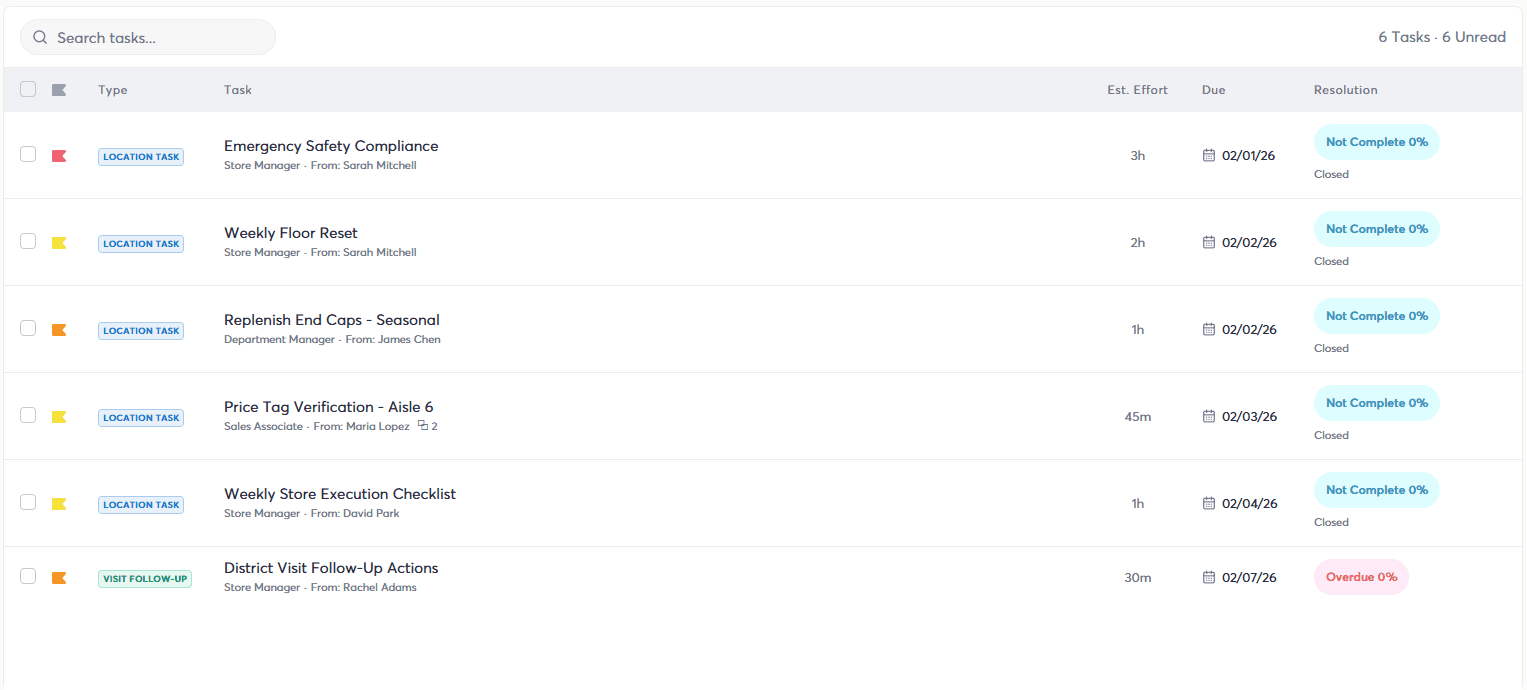
Retailers looking for task management software have two main choices: buy a standalone task app or choose a workforce management suite that includes task management alongside scheduling, labour planning, performance, and daily store operations.
A standalone task app can look like the simpler choice. You need task management, so you buy a task management tool.
But retail tasks do not happen on their own. Every task requires an employee, time in their shift, available labour, and a place among everything else the store needs to accomplish that day.
That is the weakness of treating task management as a standalone function.
A workforce management suite connects the task to the workforce responsible for completing it. It also gives frontline employees one system to learn, gives managers fewer systems to monitor, and gives retailers a better way to plan store work alongside the people and hours available to do it.
If you are already investing in task management, the real question is whether it makes sense to keep it separate from everything it depends on.
Take control of your store's performance
Book a demo with StoreForce today and run your retail operations better tomorrow.
Book a Demo
A Standalone Task App Only Sees The Task While a WFM Suite Sees The Store Around It
This is the biggest limitation of standalone task management.
A task app can tell you that a merchandising change needs to happen Thursday, that it will take several hours, and that it needs to be completed before the store closes.
But someone has to do it. Those hours have to exist in the labour plan. The right employees have to be working. And the task has to fit around customer traffic and everything else happening in the store.
A standalone task app manages the work while the WFM system manages the workforce. That leaves the retailer, and often the store manager, responsible for connecting the two.
A WFM suite brings task management into the same system that already understands the people, schedules, and labour behind the store day.
Knowing what needs to get done is useful. Knowing whether you have the people and hours to get it done is much more useful.
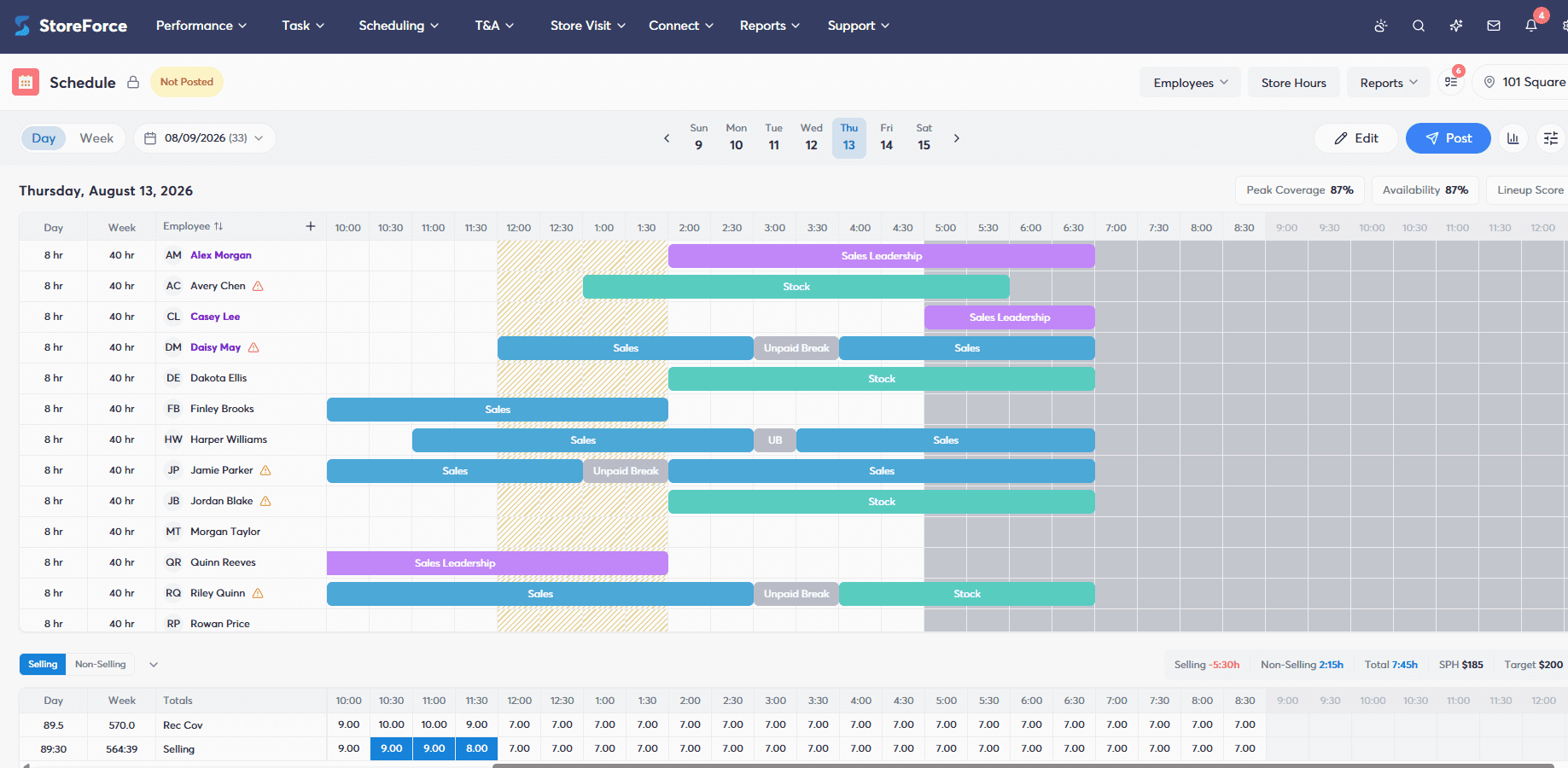
Tasks Create Labor Demand So They Should Help Shape The Schedule
Retailers already plan labour around customer demand. Tasks create another form of labour demand.
A shipment that takes five hours is five hours of work that needs to appear somewhere in the labour plan. A floor set requiring three employees for two hours represents six employee hours. Inventory counts, price changes, audits, training, and promotional work all compete for employee time.
A standalone task app can create and assign that work without the schedule ever accounting for it. That is how retailers end up with a perfectly organised task list and a store that does not have enough planned labour to complete it.
A WFM suite gives task workload a place in the wider workforce plan. Instead of asking managers to squeeze tasks into whatever hours happen to be available, the work itself can help inform how the store should be staffed.
A task plan without a labour plan is only half a plan.
Another Standalone Task App Means Another System Your Stores Have to Manage
It is easy to look at a standalone task app from head office and think, "It is only one more app."
For store teams, one more app means another system to learn, open, check, manage, and remember.
Employees need access. Managers need training. New hires need to be onboarded. Someone needs to manage accounts and permissions. The business has another platform to pay for and support. Managers also need to make sure employees are actually checking it.
After all of that, the task app may still have little understanding of what is happening in the workforce management system beside it.
That creates an unnecessary divide. A retailer pays for one application to manage employee work, then relies on managers to connect that work to another system that manages the employees.
With task management inside a WFM suite, frontline employees can use one familiar system to see when they are working and what needs to get done. Managers have fewer systems to monitor, new hires have less software to learn, and head office has fewer platforms to manage.
Before buying another standalone app, ask whether your stores need more software or simply need task management to work with the software they already use.
A Standalone Task App Shows What Was Missed While a WFM Suite Adds The Workforce Context
Task completion tells retailers whether work got done. It does not always explain why it did or did not happen.
Imagine one store completes 98% of its assigned tasks while another completes 75%. The task app can make that difference clear, but the percentage alone does not tell the whole story.
Did the second store have enough labour? Were several major tasks due on the same day? Did deadlines overlap with peak customer traffic? Was an absence affecting the shift? Was the store given more work than its available hours could reasonably support?
Those are workforce questions.
When task management lives inside a WFM suite, task execution sits closer to the workforce information surrounding it. Leaders get more context for understanding whether they are looking at an execution problem, a staffing problem, or a planning problem.
A missed task tells you something went wrong. Workforce context helps you understand what needs to change.
A Cheaper Standalone Task App Can Cost More Once You Count the Work Around It
A standalone task app may look like the less expensive option when retailers compare software prices. But the licence is only one part of the cost.
There is employee training, manager training, accounts and permissions, another platform to support, and the time spent switching between the task app and WFM system. If the retailer later decides the task tool needs employee or scheduling data, there can also be costs associated with connecting the systems.
Then there is the daily store time spent filling the gaps between them.
A few extra minutes may not seem important in one store on one day. Across hundreds of stores, thousands of employees, and an entire year, those minutes become much harder to ignore.
A WFM suite should not be compared with the sticker price of a task app alone. It should be compared with the full cost of buying, managing, training, connecting, and using another standalone system.
The question is not only what the task app costs. It is what keeping task management separate costs the business.
The Case For a WFM Suite Gets Stronger As Your Store Network Grows
One extra application may be manageable across a handful of stores. Retail scale changes the calculation.
More locations mean more employees to train, more managers moving between systems, more accounts to manage, and more opportunities for stores to create their own workarounds when systems do not fit together.
A WFM suite gives retailers a more consistent way to manage tasks across the store network. Head office can send work through the same environment stores use to manage the workforce. Managers know where to go, employees know where to look, and the same process can be repeated across locations.
What looks like a small software decision at head office can become a daily process for thousands of people. The larger the retailer, the more important it becomes to keep that process simple.
Two Systems Can Also Mean Two Vendors to Manage
Choosing a standalone task app does not only add another system. It can add another vendor relationship.
That means another contract, another renewal, another support team, another product roadmap to follow, and another vendor that needs to understand how your stores operate.
It can become even more frustrating when the task app and WFM system need to share information. If something stops working as expected, figuring out where the problem sits can become part of the problem itself.
A WFM suite gives retailers one partner responsible for more of the store workflow. There are fewer moving parts to manage and clearer ownership of the technology your frontline teams depend on every day.
For a large retailer, reducing vendor complexity can be just as valuable as reducing software complexity.
Sometimes the simpler technology stack is also the simpler vendor strategy.
StoreForce Makes Task Management Part of the Workforce Plan
StoreForce brings task management into the same retail workforce management platform used for employee scheduling, performance tracking, and daily store operations.
Frontline employees can use one familiar system for their schedules and daily responsibilities. Managers can see the work that needs to happen alongside the people and labour available to complete it. Task workload can become part of better scheduling and workforce planning, while retail leaders get more context around store execution.
A standalone task app can help organise the work.
StoreForce connects that work to the people, time, schedule, and store plan behind it.
Before buying another standalone task app, ask a simple question: If every task depends on your workforce, why pay for another system that treats the two separately?
Book a StoreForce demo to see how task management works when it is built into your retail workforce management suite.

See How StoreForce Can Work for Your Stores
See how StoreForce brings employee scheduling, labour optimisation, task management, and store execution together in one retail workforce management platform. Book a demo today to see what StoreForce can do for your teams.
Speak To A Retail Expert


