Manual Shift Boards vs. Integrated Workforce Management Software
The trade-off largely comes down to immediate simplicity and lower cost versus scalability, automation and greater insight into staffing decisions.

Manual shift boards can be a simple and inexpensive way to organize employee schedules, particularly for smaller retail teams with predictable staffing needs. Integrated workforce management software requires greater investment and implementation but can provide larger retailers with more automation, visibility and control over scheduling and labor.
The trade-off largely comes down to immediate simplicity and lower cost versus scalability, automation and greater insight into staffing decisions.
For a single store with a small team, a manual schedule may provide everything a manager needs. As the number of employees, locations and factors influencing staffing increases, however, managing schedules manually can become increasingly difficult.
What Is a Manual Shift Board?
A manual shift board is a schedule that managers create and maintain without an integrated workforce management system. It could be a physical whiteboard or printed schedule in a back room, or a spreadsheet or calendar that managers update themselves.
The advantage is simplicity.
Managers can assign employees to shifts, make changes and give their teams a clear view of who is expected to work. There may be little or no implementation required, and managers can maintain direct control over the schedule.
For a small retail team with relatively consistent staffing requirements, that may be enough.
The limitation is that most of the decisions behind the schedule also have to be made manually. Managers still need to determine how much coverage they need, who is available, how many labor hours they can use and when the store is likely to be busiest.
What Is Integrated Workforce Management Software?
Integrated workforce management software brings scheduling together with more of the information retailers use to determine their staffing requirements.
Depending on the platform, that can include employee availability, labor budgets, forecasted customer demand, time and attendance, employee self-service and other information about what is happening across the store.
Instead of using one system to build the schedule and other systems or spreadsheets to understand labor and demand, managers can use connected information to make scheduling decisions.
This changes the question from simply "Who is working and when?" to "Who should be working, when do we need them and how does that fit within our available labor?"
Manual Shift Boards vs. Workforce Management Software: What Are the Main Trade-Offs?
Neither approach is automatically the right choice for every retailer. The value of workforce management software increases as scheduling becomes more complex.
Consideration | Manual Shift Boards | Integrated Workforce Management Software |
|---|---|---|
Initial cost | Lower | Higher |
Setup | Minimal | Requires implementation |
Small-team scheduling | Simple | May provide more capability than required |
Schedule changes | Updated manually | Managed digitally |
Employee access | Usually limited | Digital and mobile access |
Customer demand | Considered manually | Can be incorporated into planning |
Labor visibility | Requires manual tracking | Can be integrated with scheduling |
Multi-location use | Difficult to scale | Designed for greater scale |
Reporting and visibility | Limited | Greater organizational visibility |
The biggest differences become clearer when looking at how each approach works in practice.
1. Lower Cost vs. Greater Capability
One of the strongest arguments for manual scheduling is cost.
A whiteboard, printed schedule or spreadsheet requires little financial investment. A retailer can begin using one immediately without purchasing, implementing or training employees on a workforce management platform.
For a small operation, paying for capabilities the business does not need may add unnecessary complexity.
Integrated workforce management software requires an investment, but that investment provides capabilities beyond displaying who is working. As scheduling becomes more complicated, retailers can use software to help manage the information and decisions that would otherwise fall on individual managers.
The question is whether the additional capability solves enough scheduling complexity to justify that investment.
2. Immediate Simplicity vs. Long-Term Scalability
Manual shift boards are difficult to beat for immediate simplicity.
A manager can write an employee's name beside a shift and the schedule is updated.
But what is simple for one store does not necessarily remain simple across 50, 100 or 1,000 locations.
Each additional store introduces more employees, availability requirements, schedules, labor budgets and changes that need to be managed. If every location follows its own manual process, the retailer can also have limited visibility into how schedules are being created across the organization.
Integrated workforce management software provides a common system that can scale alongside the organization.
The trade-off is greater complexity during implementation in exchange for a simpler and more consistent process as the organization grows.
3. Manager Control vs. Automation
Manual scheduling gives store managers significant control.
Managers often know their employees and stores extremely well. They may know which team members work well together, who prefers certain shifts and when they expect the store to become busy.
A manual process allows them to apply that knowledge directly.
The downside is that the manager also has to do much of the work.
They may need to check availability, calculate available labor, anticipate customer traffic and make adjustments themselves.
Workforce management software can help automate or guide parts of that process by bringing relevant information into scheduling decisions. Managers can still apply their knowledge of the store, but they do not have to rely entirely on manual calculations and assumptions.
4. Local Flexibility vs. Organizational Consistency
Manual scheduling can give individual stores considerable flexibility in how they operate.
For smaller organizations, that independence may be valuable. Managers can develop a scheduling process that works for their particular teams without needing to follow a larger system.
The trade-off becomes more significant for multi-location retailers.
If every manager has a different way of building and maintaining schedules, it becomes harder to create consistent processes or understand how labor is being planned across the organization.
Integrated workforce management software can give stores a common scheduling framework while providing district, regional and corporate leaders with greater visibility across locations.
5. Basic Scheduling vs. Demand-Based Scheduling
A manual shift board is very good at showing the finished schedule. What it cannot do by itself is determine what that schedule should look like.
Managers may use their experience to anticipate busy periods or consult separate traffic reports before deciding how much coverage to schedule.
Integrated workforce management software can bring expected customer demand closer to the scheduling process.
If a store is expected to experience higher traffic during particular hours, managers can use that information when determining where labor should be positioned. During quieter periods, they can avoid scheduling unnecessary coverage.
This allows scheduling to become more closely connected to when customers are actually expected to shop.
6. Physical Visibility vs. Employee Self-Service
A physical shift board has one obvious advantage: employees can walk into the store and see the schedule.
For a small team working predictable shifts, that can be perfectly effective.
It becomes less convenient when employees are away from the store or schedules change frequently. Managers may need to communicate changes individually, collect availability or coordinate shift swaps themselves.
Workforce management software can give employees digital or mobile access to their schedules and provide self-service options for common scheduling activities.
That can make the schedule easier for employees to access while reducing some of the administrative work handled by managers.
When Does a Manual Shift Board Make Sense?
A manual scheduling process can make sense when the retail environment itself is relatively simple.
That may include a retailer with one location, a small team, predictable operating hours, relatively consistent staffing requirements and few schedule changes.
If managers can create schedules quickly, employees can access them easily and the business is comfortable with its current level of labor visibility, moving to an integrated workforce management system may provide more capability than the organization currently needs.
The important question is whether the manual process is still making scheduling easier or has started creating additional work.
When Is It Time to Move From Manual Scheduling to Workforce Management Software?
The case for workforce management software becomes stronger when managers have more variables to consider and manual processes begin making scheduling harder to manage.
That can happen when:
The retailer adds more locations or employees
Managers spend significant time creating and revising schedules
Schedule changes become more frequent
Labor budgets become harder to track manually
Stores struggle to align staffing with customer traffic
Employees need easier access to schedules and shift changes
Leadership needs greater visibility across locations
Scheduling information is spread across multiple systems or spreadsheets
At that point, the challenge is no longer simply creating a schedule. It is bringing together all of the information required to determine what that schedule should look like.
Integrated workforce management software can move more of that work into a connected process.
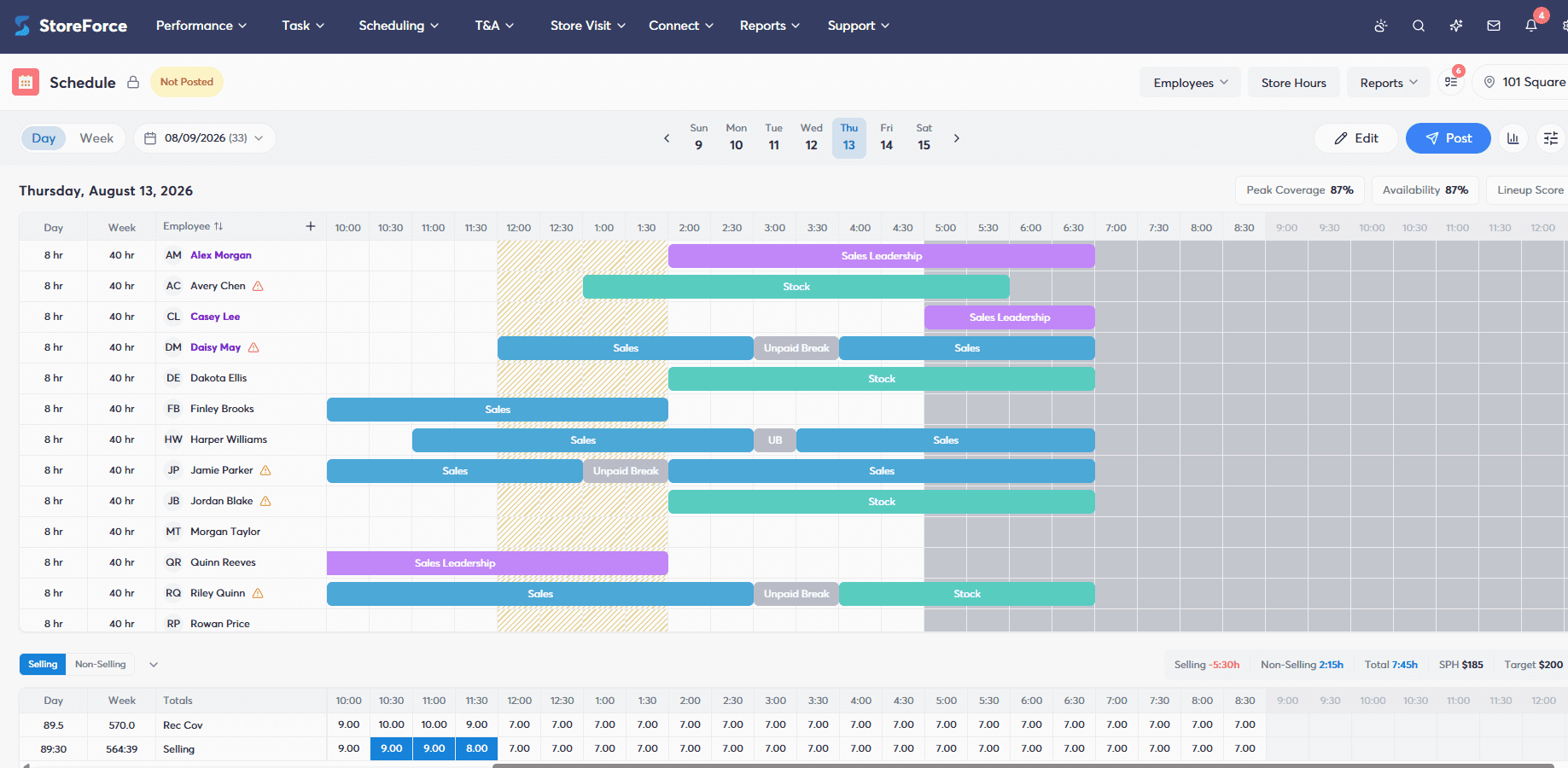
How Does StoreForce Replace Manual Retail Scheduling?
For larger and multi-location retailers, StoreForce brings scheduling together with the information managers need to make staffing decisions.
Rather than asking managers to manually piece together expected customer demand, available labor, employee availability and other store requirements, StoreForce helps make that information part of the workforce planning and scheduling process.
Managers can use expected demand to understand when stores need coverage, build schedules around available labor and give employees easier access to information about their workday.
For retail leaders, a connected platform also provides greater consistency and visibility across locations than individual manual scheduling processes.
The goal is not to take scheduling decisions away from store managers. It is to give them better information and reduce the amount of manual work required to make those decisions.
Manual Shift Boards or Workforce Management Software: Which Is Better?
For smaller retailers with straightforward staffing requirements, manual shift boards can remain an inexpensive and effective way to manage employee schedules.
For larger and multi-location retailers, integrated workforce management software becomes increasingly valuable as the number of people, stores and factors influencing staffing grows.
Ultimately, the trade-off comes down to the complexity of the retail operation.
A manual shift board can tell employees who is working and when. Integrated workforce management software can help retailers determine who should be working, when they are needed and how that schedule fits within the broader needs of the store.
The best approach is the one that makes those decisions easier to manage at the scale at which the retailer operates.

Retail Execution With StoreForce
Improving labor, tasks and overall execution is just a click away. Book a demo today and see what the right retail workfroce manageemnt software can do for your teams
Speak To A Retail Expert