Simplify Multi-Location Retail Teams with Scheduling Software Today
Learn how employee scheduling software for multiple locations helps retailers organize shifts, control labor costs, and manage staff across every store.
Multi-location scheduling software is becoming essential for retailers that operate more than one store. Multi-location scheduling software helps businesses plan employee shifts across many locations while keeping labor organized, consistent, and easy to manage.
Without multi-location scheduling software, scheduling quickly becomes messy. Many retailers still rely on spreadsheets, emails, or basic tools that were never designed for managing schedules across multiple stores. As businesses grow, this approach creates problems. Stores become overstaffed or understaffed; managers spend hours fixing schedules, and leadership loses visibility across locations.
Multi-location scheduling software solves this by putting scheduling for every store into one system. Managers can build schedules faster, employees can see their shifts instantly, and retail leaders can track labor performance across every location.
In this article, we will look at how it all works, why growing businesses need better scheduling tools, the features that matter most, and the best ways to manage employee schedules across multiple locations. We will also explain why StoreForce was built specifically to support multi-location workforce management.
How Multi-Location Scheduling Software Works
Multi-location scheduling software helps businesses manage employee schedules across multiple stores from one system. Multi-location scheduling software gives managers a clear view of who is working, where they are working, and when they are scheduled. For retailers and other multi-location businesses, multi-location scheduling software removes the confusion that often comes with managing schedules in spreadsheets, emails, or separate tools.
When scheduling is handled in different places, mistakes happen. Stores get overstaffed or understaffed. Managers spend hours fixing schedules. Employees struggle to see their shifts.
Multi-location scheduling fixes this by bringing scheduling into one connected platform.
Here is how it typically works:
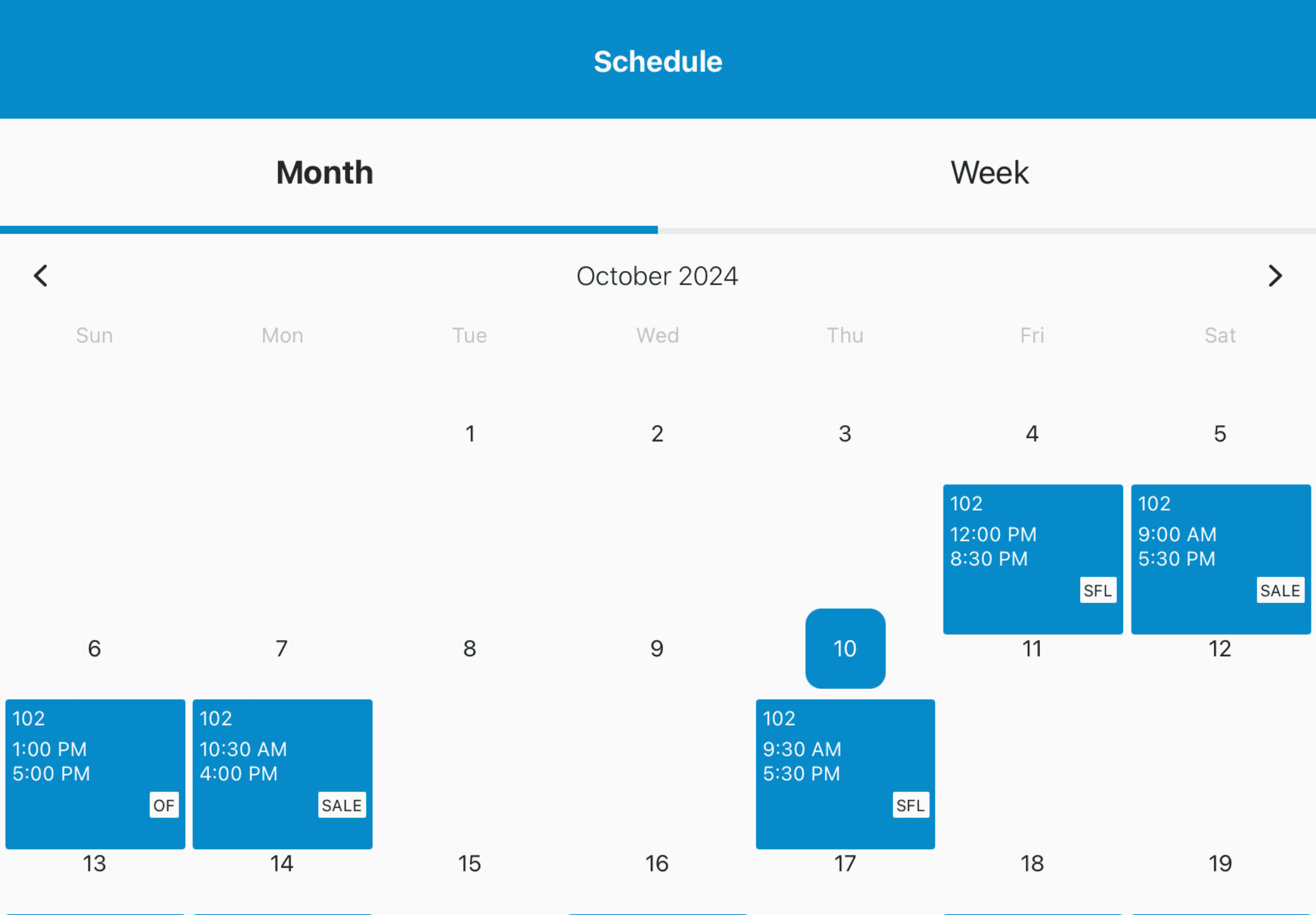
Managers build schedules for multiple stores in one system
Labor targets and staffing needs guide scheduling decisions
Employee availability is stored in the system and used during schedule creation
Staff can be scheduled across different locations when needed
Employees receive schedules and updates instantly
With the right system in place, multi-location scheduling software gives retail leaders full visibility across every location. It helps ensure the right number of people are scheduled at the right time in every store.
Take control of your store performance
Book a demo with StoreForce today and run your retail operations better tomorrow.
Book A Demo
Why Multi-Location Businesses Need Advanced Scheduling Software
Multi-location businesses face scheduling challenges that single-store operations rarely deal with. The more locations you operate, the harder it becomes to keep schedules organized and consistent.
Many companies still rely on spreadsheets or basic scheduling tools that were not built for multi-location workforce management. These tools quickly break down when dozens or hundreds of locations are involved.
Advanced scheduling software solves several major problems.
First, it creates consistency across all locations. Without a centralized system, every manager may schedule differently. This leads to uneven staffing, missed labor targets, and poor customer experiences.
Second, it improves visibility for district and regional leaders. With advanced scheduling software, leadership can see labor performance across every location in real time.
Third, it helps to control labor costs. Labor is one of the largest expenses for retail businesses. Better scheduling means stores are staffed based on demand, not guesswork.
Finally, advanced scheduling software saves managers a huge amount of time. Instead of building schedules from scratch each week, managers can follow labor guidance and approved staffing plans.
For multi-location businesses, scheduling software quickly becomes one of the most important operational systems in the store.
Essential Features in Employee Scheduling Software for Multiple Locations
Not all scheduling software is built for businesses with many locations. When evaluating employee scheduling software for multiple locations, there are several features that matter most.
Centralized scheduling dashboard
Managers should be able to build and manage schedules across multiple stores from a single dashboard. This creates full visibility and keeps scheduling consistent.
Cross-location employee scheduling
Employees often work in more than one location. The system should allow staff to be scheduled across stores while keeping hours and availability organized.
Labor target alignment
Scheduling should be tied to labor goals and sales forecasts. This helps ensure stores are staffed properly without overspending on labor.
Employee availability tracking
Employee availability should live inside the scheduling system. Managers should be able to see availability instantly when creating schedules.
Mobile schedule access
Employees should be able to view schedules, receive updates, and request changes from their phones.
Real-time schedule updates
Changes happen often in retail. When schedules are updated, employees should receive immediate notifications, so nothing is missed.
When these features work together, scheduling becomes faster, more accurate, and much easier to manage across multiple locations.
Best Practices for Managing Employee Schedules Across Multiple Locations
Even with great software, strong scheduling habits matter. Businesses that manage schedules across multiple locations successfully tend to follow a few key practices.
Build schedules around demand
Use sales trends and traffic patterns to guide staffing levels. Stores should have more staff during busy hours and fewer during slower periods.
Keep scheduling consistent across stores
Create clear guidelines for managers so schedules follow the same standards across all locations.
Use shared employee pools
Many multi-location businesses allow employees to work shifts in nearby stores. This helps fill schedule gaps quickly and keeps stores fully staffed.
Publish schedules early
Employees perform better when they know their schedules ahead of time. Early schedule releases also reduce last minute changes.
Monitor labor performance weekly
Scheduling should not stop once the schedule is posted. Managers and leadership should review labor performance each week and adjust future schedules accordingly.
These habits make a major difference in keeping multi-location scheduling organized and predictable.
Why StoreForce Is Built for Multi-Location Workforce Management
StoreForce was designed specifically for retailers with multiple locations. While many scheduling tools focus on single-store businesses, StoreForce was built to give retail leaders control and visibility across an entire fleet of stores.
With StoreForce, managers can build schedules that align with sales and labor targets while keeping employee availability and tasks organized in one system.
District and regional leaders gain visibility across all locations. They can see staffing levels, schedule execution, and labor performance in real time without chasing reports from each store.
StoreForce also connects scheduling with daily store execution. Tasks, goals, and store performance all live in the same platform, which helps teams stay aligned and focused.
For multi-location retailers, this creates a much more organized way to run stores.
Instead of juggling spreadsheets, disconnected systems, and manual updates, StoreForce gives retail teams one place to manage their workforce and keep every location running smoothly.
If your business operates multiple stores, scheduling software designed for multi-location workforce management can make a major difference in both efficiency and store performance.

See How StoreForce Can Work for Your Stores
See how StoreForce brings employee scheduling, labor optimization, task management, and store execution together in one retail workforce management platform. Book a demo today to see what StoreForce can do for your teams.
Speak To A Retail Expert


