Stop Manually Scheduling in Retail Environments
Learn how retail employee scheduling software improves staffing, reduces labor costs, and helps stores run smoothly. Explore key features, benefits, and best practices.

Retail employee scheduling software has become an important tool for modern retail teams. Building schedules in retail is rarely simple. Managers must balance employee availability, labor budgets, customer traffic, and store goals every single week.
Without the right system, scheduling can quickly turn into a time-consuming process filled with spreadsheets, last minute changes, and communication gaps. Retail employee scheduling software helps solve this by giving managers one place to plan schedules, manage labor hours, and keep teams informed.
In this guide, we will break down what retail employee scheduling software is, why scheduling is more complex in retail, and how the right tools can help stores run more efficiently.
What Is Retail Employee Scheduling Software
Retail employee scheduling software helps store managers plan, organize, and adjust staff schedules in one system. Instead of juggling spreadsheets, paper schedules, texts, and last-minute changes, managers can build schedules digitally and share them with the entire team in seconds.
In retail, scheduling is closely tied to sales performance. The number of associates on the floor at any moment can impact customer service, conversion rates, and overall store productivity. Retail scheduling software helps managers match staffing levels to real demand so stores stay well-staffed during busy periods and avoid overstaffing during slower hours.
Most retail employee scheduling software also connects schedules with other daily store activities such as tasks, sales goals, and store performance tracking. This helps managers make smarter scheduling decisions and gives leadership better visibility across multiple locations.
For retail teams, the goal is simple: make sure the right people are working at the right time so stores can run smoothly and hit their targets.
Take control of your store performance
Book a demo with StoreForce today and run your retail operations better tomorrow.
Book A Demo
Why Scheduling Is More Complex in Retail
Retail scheduling is very different from scheduling in many other industries. Customer traffic changes throughout the day, week, and season, which means staffing needs constantly shift.
Managers are not just filling time slots. They are trying to align labor with sales opportunities while also managing employee availability, labor budgets, and company policies.
A few things make retail scheduling especially difficult:
Fluctuating customer traffic
Retail stores rarely have steady demand. Weekends, holidays, promotions, and weather can all impact how busy a store gets. Managers need schedules that can adjust to these changes.
Part-time and flexible staff
Many retail teams rely heavily on part time associates. Employees may have school schedules, second jobs, or limited availability, which makes scheduling more complicated.
Labor cost targets
Retail leaders closely watch labor costs as a percentage of sales. Managers need to build schedules that support strong customer service while still staying within labor budgets.
Multiple store locations
For brands with several stores, keeping scheduling practices consistent across locations can be difficult without the right tools.
Retail employee scheduling software helps simplify these challenges by giving managers better visibility, faster scheduling tools, and clearer labor insights.
Key Features of Retail Employee Scheduling Software You Should Be Looking For
The best retail employee scheduling software is built specifically for the pace and complexity of store operations. Retail managers are balancing customer traffic, labor budgets, employee availability, and store goals every single week. The right software helps bring all of this into one clear system.
Instead of juggling spreadsheets, texts, and paper schedules, managers can plan staffing with better visibility and far less manual work. Strong scheduling tools also connect labor decisions to sales performance so managers can schedule with purpose, not guesswork.
Here are the features that matter most.
Easy schedule creation (no more manual creation)
Retail managers often spend hours each week on building schedules. Good scheduling software should make this process much faster.
Most platforms allow managers to build schedules using drag and drop tools, prebuilt templates, or auto generated shifts based on past schedules. Managers can quickly assign associates to shifts, adjust coverage, and publish schedules to the entire team in minutes.
This saves time and helps managers focus more on running the store rather than constantly adjusting schedules.
Employee availability tracking
Retail teams often include a mix of full-time associates, part-time employees, students, and seasonal workers. Availability can change frequently, which makes scheduling difficult without the right system.
Scheduling software allows employees to enter their availability directly into the platform. Managers can easily see who is available to work before building the schedule.
This reduces scheduling conflicts, prevents accidental double booking, and helps managers create schedules that work for both the business and the team.
Shift swapping and schedule updates
Schedule changes are common in retail. Employees may need to swap shifts, request time off, or pick up additional hours.
Retail scheduling software makes this process much easier. Employees can submit shift swap requests or time off requests directly in the system. Managers can review and approve requests quickly while keeping control over coverage.
Instead of long text message threads or last-minute confusion, all schedule changes stay organized in one place.
Labor forecasting
One of the most valuable features in retail scheduling software is the ability to plan staffing based on expected demand.
Some platforms connect scheduling with sales data and traffic patterns. Managers can see when their store is typically busiest and schedule more associates during those periods.
This helps stores avoid two common problems in retail: being understaffed during peak hours and overstaffed during slower times.
Better labor forecasting allows managers to balance customer service with labor cost control.
Mobile access for employees
Retail associates rarely sit at a desk. They are on the sales floor, in stockrooms, or helping customers throughout the day.
Mobile access allows employees to check schedules, receive updates, pick up shifts, and request time off directly from their phones. Managers can also send schedule updates or announcements instantly.
This keeps communication simple and helps ensure everyone always has the latest schedule information.
Multi-store visibility
For retailers operating multiple locations, scheduling becomes even more complex. Leadership teams need visibility across every store.
Retail scheduling software allows district and regional managers to review schedules across locations, compare labor performance, and ensure scheduling standards are followed.
This visibility helps brands keep labor planning consistent across the entire business.
When these features work together, scheduling becomes far more structured. Managers can plan labor with confidence, employees stay informed, and stores are better prepared for customer demand.
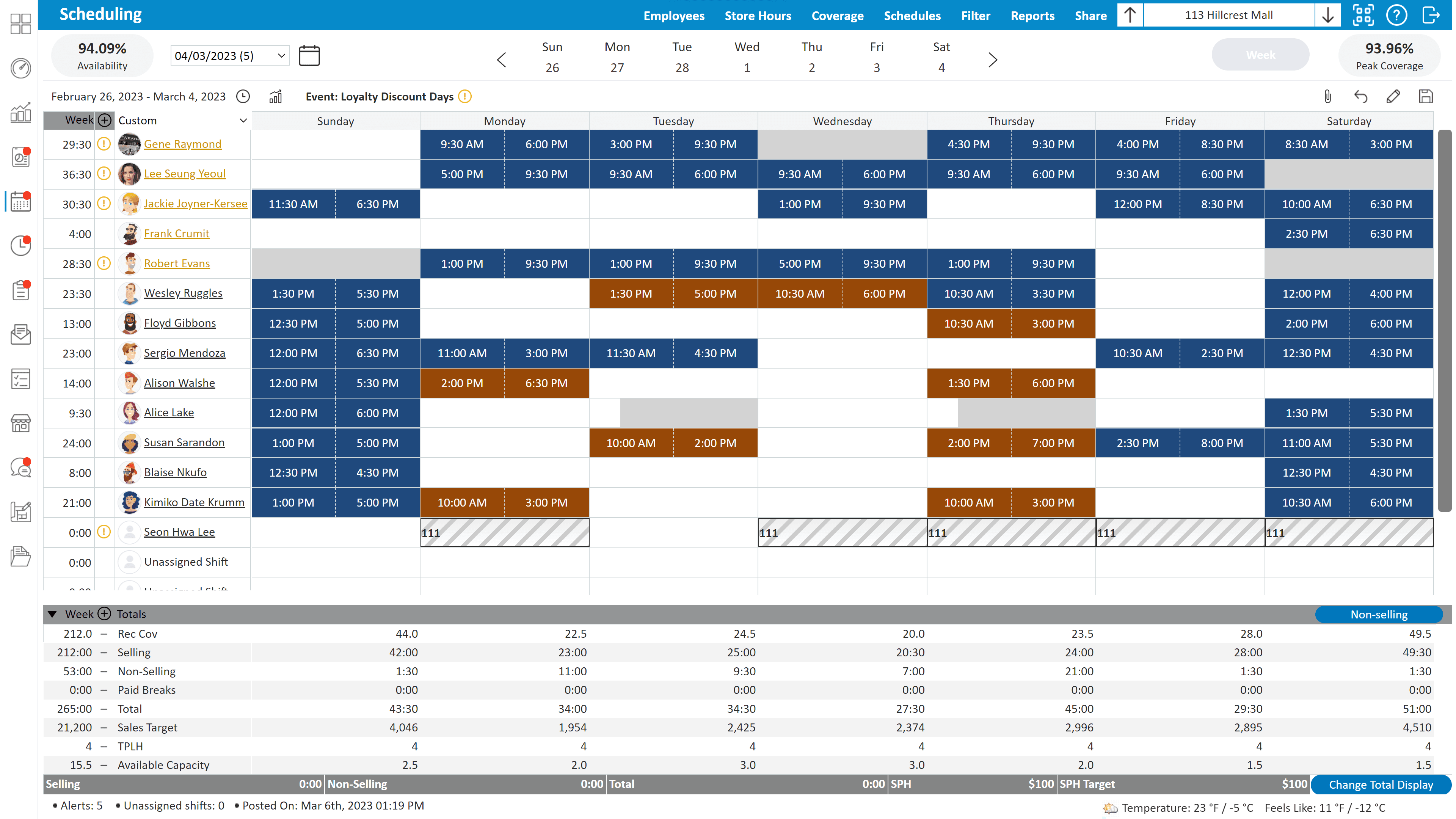
Benefits Of Retail Employee Scheduling Software
When managers have the right tools to plan staffing levels, communicate with employees, and monitor labor performance, stores tend to run more smoothly and consistently.
Better customer coverage
When schedules match customer traffic patterns, stores have enough associates on the floor during peak hours. This improves customer service and reduces missed sales opportunities.
For example, if a store typically sees higher traffic in the late afternoon or on weekends, managers can schedule stronger coverage during those periods. This helps ensure customers can always find help when they need it, which can improve conversion rates and overall store performance.
Lower labor waste
Better planning helps prevent overstaffing during slow periods. Managers can keep labor costs aligned with sales instead of scheduling based on guesswork.
Retail scheduling software also gives managers clearer visibility into labor hours, helping them stay within payroll targets while still supporting the needs of the store.
Less time spent building schedules
Many store managers spend hours each week creating schedules, adjusting shifts, and responding to last minute changes.
Scheduling software reduces this time dramatically. Managers can reuse templates, review employee availability quickly, and make adjustments in a few clicks. The time saved can then be spent on coaching associates, improving the sales floor, and helping customers.
Stronger employee satisfaction
Clear schedules and better communication reduce frustration for retail staff. Employees can see their shifts earlier, manage availability, and request changes easily.
This level of transparency helps build trust with the team. Associates know when they are working, can plan their personal schedules, and feel more in control of their time.
Consistency across stores
Retail leaders can maintain scheduling standards across multiple locations and quickly spot labor issues.
With centralized scheduling data, district and regional managers can compare staffing levels between stores, identify locations that may be over or under scheduled, and support managers who need help improving labor planning.
For retailers trying to control labor costs while still delivering strong customer experiences, scheduling software becomes a powerful tool. When staffing decisions are based on real store data and clear communication, both employees and customers benefit.
Retail Scheduling Metrics Every Manager Should and Can Track With The Right Software
Retail scheduling works best when managers pay attention to the right numbers. A schedule should not be based on instinct alone. The best retail managers regularly review performance data to see if their staffing decisions are helping the store perform well.
These metrics help managers understand whether staffing levels match real store demand and whether labor hours are being used effectively.
Here are some of the most important retail scheduling metrics every manager should keep an eye on.
Labor cost as a percentage of sales
Labor cost as a percentage of sales shows how much of store revenue is being spent on staffing. This is one of the most closely watched retail metrics because it directly impacts store profitability.
Managers typically review this number weekly to make sure payroll stays aligned with sales performance. If labor costs start climbing too high compared to revenue, it may mean the store is being overstaffed during slower periods.
At the same time, labor should not be reduced so much that customer service suffers.
Sales per labor hour
Sales per labor hour measures how much revenue is generated for every hour of labor scheduled in the store.
This metric helps managers see whether staffing levels are helping or hurting store productivity. When the right number of associates are scheduled during the busiest periods, sales per labor hour often improves.
Managers often review this metric when evaluating whether schedules are supporting strong sales performance.
Coverage during peak hours
One of the most common scheduling mistakes in retail is being understaffed during the busiest times of the day.
Managers should regularly review peak traffic periods and make sure the store has enough associates on the floor during those hours. If stores are consistently short staffed during busy periods, it can lead to long checkout lines, poor customer service, and missed sales opportunities.
Key peak coverage questions managers should ask include:
Are the busiest hours fully staffed?
Are experienced associates scheduled during peak selling periods?
Is the sales floor properly covered during weekends and promotions?
Schedule changes and shift swaps
Frequent schedule changes can signal problems with the scheduling process. If employees are constantly swapping shifts or requesting adjustments, it may mean schedules are not aligning well with employee availability.
Tracking this activity helps managers identify patterns and make better scheduling decisions over time.
Things managers may want to monitor include:
The number of shift swap requests each week
Last minute schedule changes
Repeated availability conflicts with certain employees
Reducing schedule instability can help stores operate more smoothly.
Employee attendance
Employee attendance is another important metric tied to scheduling success. Reliable attendance ensures the store always has proper coverage.
When attendance issues appear frequently, managers may need to adjust scheduling practices or address reliability concerns with certain employees.
Tracking attendance helps managers spot patterns such as:
Frequent call outs on certain days
Late arrivals during opening shifts
Employees who consistently miss scheduled shifts
Retail employee scheduling software often tracks these metrics automatically. This gives managers better insights into labor performance without needing to manually track data in spreadsheets. When managers regularly review these numbers, scheduling decisions become much more informed and effective.

How Retail Workforce Scheduling Improves Store Performance and ROI
When staffing levels match customer demand, stores run more smoothly and serve customers better. Good scheduling helps ensure the right number of associates are on the floor when the store is busiest.
Retail workforce scheduling software helps connect labor planning with store performance by giving managers clear visibility into staffing, sales trends, and labor hours.
Strong scheduling can help retailers:
Improve customer service by ensuring enough associates are on the floor during busy hours
Increase sales opportunities by supporting better customer coverage
Control labor costs by avoiding overstaffing during slower periods
Support store managers with faster, more organized scheduling tools
Create consistency across locations for multi store retail brands
Identify high performing stores and apply similar scheduling practices elsewhere
For retailers with multiple locations, leadership teams can compare labor performance across stores and spot trends that may impact results.
Over time, better workforce scheduling leads to stronger store execution, healthier labor budgets, and better experience for both employees and customers.
Book a Call to See StoreForce in Action
If you are looking for a better way to plan schedules, manage store tasks, and keep teams aligned, it may be time to look at a retail operations platform built specifically for store teams.
StoreForce helps retailers manage employee scheduling, daily store execution, and performance tracking in one place. Managers can build smarter schedules, track labor against sales, and make sure the right people are working at the right times.
Book a demo to see how StoreForce can help your retail stores run more consistently, improve labor visibility, and give managers the tools they need to lead their teams more effectively.

See How StoreForce Can Work for Your Stores
See how StoreForce brings employee scheduling, labor optimization, task management, and store execution together in one retail workforce management platform. Book a demo today to see what StoreForce can do for your teams.
Speak To A Retail Expert


