Best Retail Scheduling Software: 9 Features That Matter Most
Employee scheduling software helps teams plan shifts, control labor, and stay organized. Learn the key features, benefits, and how it improves team performance.
Employee scheduling software helps teams plan shifts, manage availability, and make sure the right people are working at the right time. As businesses grow, managing schedules with spreadsheets or paper quickly becomes difficult and time consuming.
The right employee scheduling software makes scheduling faster, reduces mistakes, and helps managers match staffing with real demand. In this guide, we will break down what employee scheduling software is, why teams use it, the problems it solves, and the features that actually matter when choosing a system.
What Is Employee Scheduling Software?
Employee scheduling software is a system that helps managers plan, manage, and adjust staff schedules from one place. Instead of using spreadsheets, paper schedules, or text messages, teams use employee scheduling software to build schedules, assign shifts, and keep everyone aligned.
It gives managers a clear view of who is working, when they are working, and whether staffing levels match business demand. It also gives employees an easy way to see their schedules, request time off, and swap shifts.
In retail, for example, scheduling is tied directly to sales and store performance. A store that schedules too many people wastes payroll. A store that schedules too few people misses sales and delivers poor customer service. Employee scheduling software helps balance both.
Modern employee scheduling software often connects scheduling with store performance data, tasks, and communication. This means managers can plan labor around real store activity instead of guessing.
Take control of your store performance
Book a demo with StoreForce today and run your retail operations better tomorrow.
Book A Demo
Why Teams Use Employee Scheduling Software
Teams use employee scheduling software because manual scheduling is slow, messy, and hard to manage as a business grows.
Retail managers already juggle a long list of responsibilities. They manage store performance, coach employees, handle inventory, run promotions, and maintain store standards. When scheduling is done with spreadsheets or paper, it becomes another time-consuming task.
Employee scheduling software helps managers build schedules faster and make better staffing decisions.
Here are some of the main reasons teams adopt employee scheduling software:
• Faster schedule creation
• Clear visibility into who is working
• Easy communication with employees
• Fewer scheduling mistakes
• Better alignment between staffing and sales
For employees, scheduling software removes a lot of frustration. Instead of asking managers about schedules or calling the store to check shifts, employees can simply open a mobile app and see their schedule.
For retail leadership, scheduling software creates consistency. When every store follows the same scheduling process, it becomes much easier to manage payroll, staffing levels, and store execution.
The Biggest Problems with Manual Scheduling
Many retailers still rely on spreadsheets, printed schedules, or whiteboards to manage employee shifts. While this may work for very small teams, it quickly becomes difficult as stores grow.
Manual scheduling creates several problems that affect both managers and employees.
Scheduling takes too long
Managers often spend hours each week on building schedules. They check availability, review time off requests, and try to balance payroll budgets.
Without the right tools, this becomes a slow and frustrating process.
Mistakes happen easily
Manual schedules often lead to double booking employees, missing availability, or forgetting time off requests. These mistakes lead to last minute changes and unhappy staff.
Poor visibility for leadership
District managers and retail leaders often have no clear view of store staffing. They cannot easily see if stores are over staffed or understaffed.
Employees struggle to stay informed
Printed schedules and spreadsheets are hard for employees to access. This leads to missed shifts, confusion, and constant schedule questions.
Staffing is not connected to demand
Manual schedules are often built using guesswork. Managers may schedule based on habits rather than real sales data.
This leads to stores being understaffed during busy periods and over staffed during slow hours.
Employee scheduling software solves these problems by centralizing scheduling and connecting staffing decisions with real business data.
How to Choose the Right Employee Scheduling Software
Not all employee scheduling software is the same. Some tools focus only on shift planning, while others connect scheduling with sales data, store tasks, and team performance.
When choosing employee scheduling software, retailers should focus on tools that make life easier for store managers while also giving leadership better visibility.
A few key questions to ask include:
• Can managers build schedules quickly?
• Can employees access schedules easily from their phones?
• Does the system connect staffing with sales or traffic data?
• Can leadership see staffing levels across multiple stores?
• Does the software support communication and task tracking?
Retail scheduling is rarely simple. Stores deal with fluctuating traffic, promotions, seasonal demand, and staff availability.
The best employee scheduling software helps managers adapt quickly while keeping staffing aligned with store performance.
Platforms like StoreForce go beyond basic scheduling by connecting labor planning with sales performance, store tasks, and real time visibility across locations.
9 Features That Actually Matter in Employee Scheduling Software
Many scheduling tools list dozens of features, but only a handful truly impact store operations. The best employee scheduling software focuses on the tools managers actually use every day.
Automated scheduling
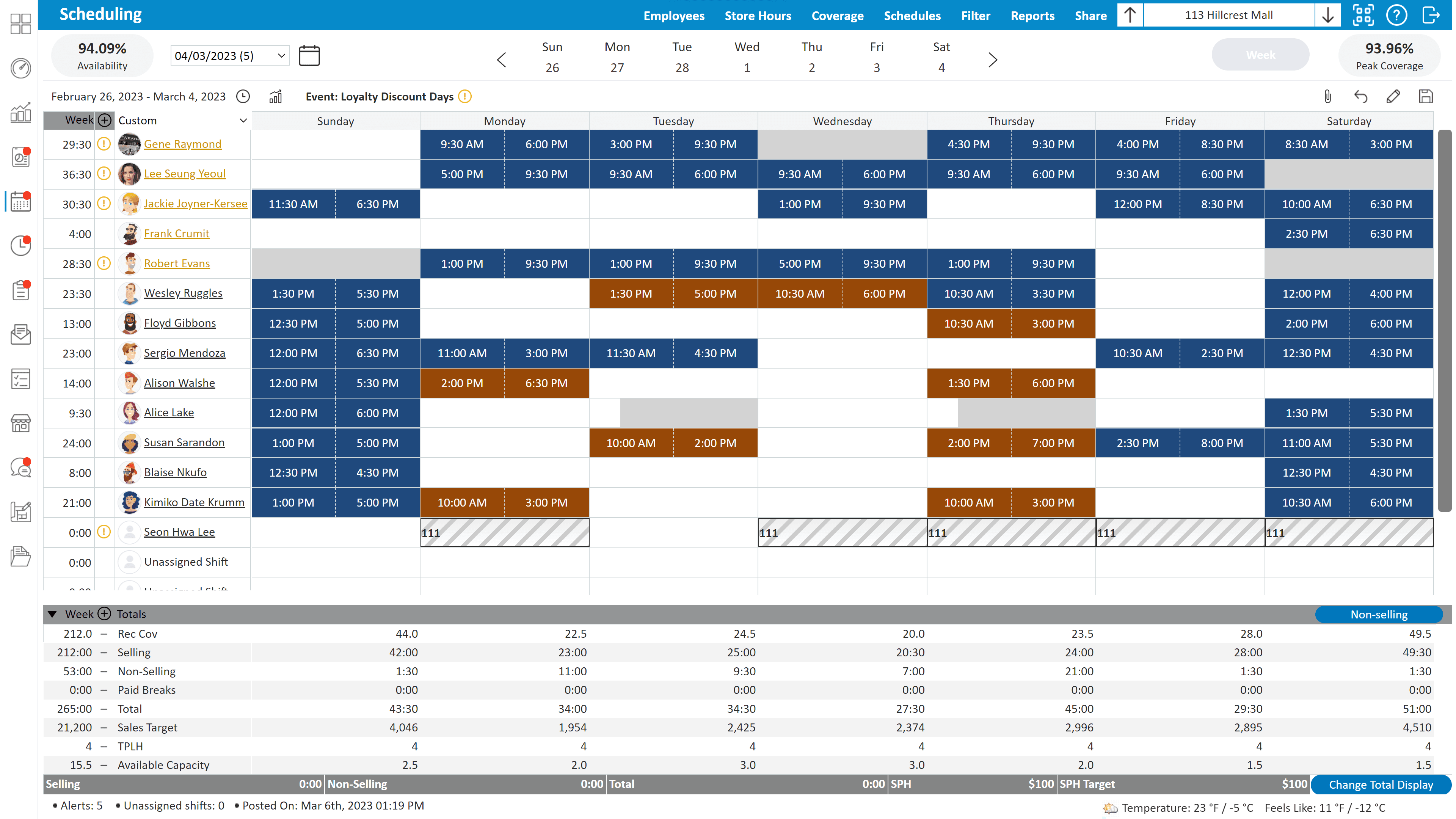
Automated scheduling helps managers build schedules faster by using rules, availability, labor targets, and staffing guidelines to create a schedule automatically.
Instead of starting with a blank calendar every week, managers can generate a schedule that already respects employee availability, approved time off, labor budgets, and store coverage needs. The system places employees into shifts based on these rules, giving managers a strong starting point within seconds.
Managers can still adjust shifts where needed. For example, they may move a top selling associate to a busy Saturday afternoon or add extra coverage during a promotion. The difference is that most of the heavy work is already done.
In retail, this makes a major difference because schedules often change week to week. Traffic patterns shift, promotions create sudden spikes in demand, and employees request time off regularly. Automated scheduling helps managers respond to these changes quickly without rebuilding the entire schedule.
Demand forecasting
Demand forecasting helps managers predict how busy the store will be.
Retail traffic changes throughout the week. A Saturday afternoon may be packed, while a Monday morning may be quiet. Demand forecasting uses sales history or traffic patterns to help managers schedule the right number of employees.
This helps stores protect payroll while still delivering strong customer service.
Mobile scheduling
Mobile scheduling gives employees access to their schedules from their phones.
Employees can check shifts, receive updates, and request time off without needing to call the store. Managers can also approve requests and adjust schedules from anywhere.
This improves communication and reduces scheduling confusion.
Take control of your store performance
Book a demo with StoreForce today and run your retail operations better tomorrow.
Book A Demo
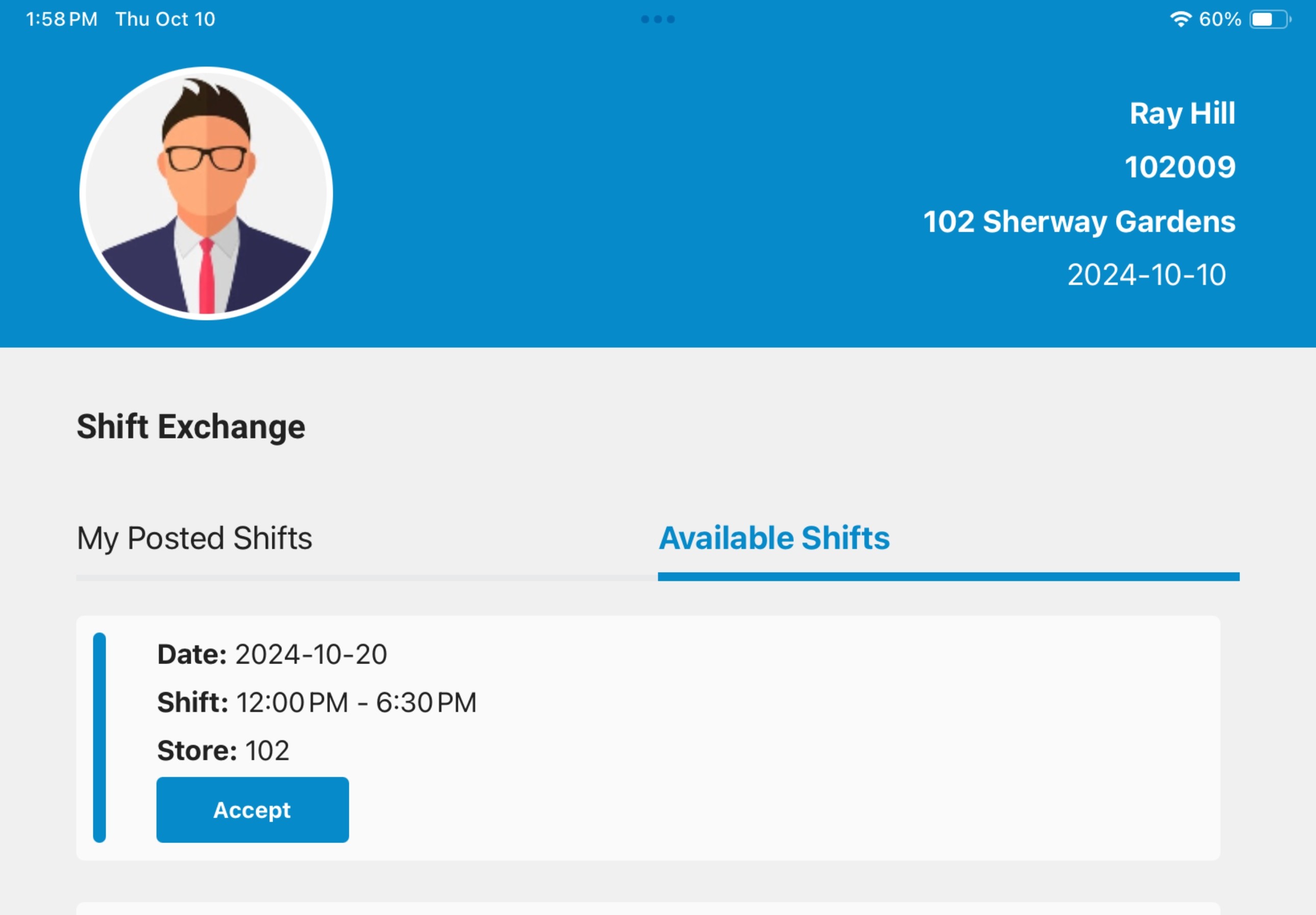
Shift swapping
Shift swapping allows employees to trade shifts with coworkers when something unexpected comes up. This could be a school commitment, a family obligation, or a scheduling conflict that appears after the schedule is posted.
With employee scheduling software, employees can submit a shift swap request directly through the system. The request can be sent to qualified coworkers who are available to take the shift. Once someone accepts the swap, the manager can review and approve it to make sure the shift still has the right coverage.
This removes a lot of the back and forth that normally happens with manual schedules. Instead of employees texting the manager or calling the store trying to find coverage, the process happens inside the scheduling system.
Real-time visibility
Real time visibility gives managers and retail leaders a clear view of staffing levels.
Store managers can see if they are over staffed or understaffed during a shift. District managers can view staffing across multiple locations.
This helps leaders catch issues quickly and make adjustments before they affect store performance.
Multi-location scheduling
Retail brands often operate dozens or even hundreds of stores. Managing schedules across many locations can quickly become difficult when each store is using its own spreadsheet or process.
Multi location scheduling brings every store schedule into one system so leaders can see staffing across the entire business. District managers and regional leaders can view schedules by store, compare labor coverage, and quickly identify locations that may be over staffed or understaffed.
This visibility helps leaders support stores more effectively. For example, if one store is struggling with high labor costs while another is consistently understaffed, leaders can spot the issue quickly and guide managers toward better scheduling decisions.
Multi-location scheduling also helps retail brands keep scheduling standards consistent. Leadership can set guidelines around staffing levels, labor targets, and scheduling rules that apply across every location. Store managers still have flexibility to adjust their schedules, but they are working within a clear framework.
Sales-driven staffing
Sales-driven staffing connects scheduling decisions directly with store performance.
Instead of guessing how many employees should work during a shift, managers can use sales data to guide staffing levels.
For example, if a clothing store knows that evenings during a promotion generate high traffic, managers can schedule more associates to support fitting rooms and checkout lines.
This approach helps protect both payroll and sales.
Reporting and analytics
Reporting tools give retail leaders clear insight into how labor is being used across their stores. Instead of relying on guesswork, leaders can see exactly how staffing decisions affect sales, payroll, and store performance.
Employee scheduling software tracks key metrics such as labor cost as a percentage of sales, total scheduled hours, coverage by time of day, and how closely schedules match actual sales patterns.
Labor is one of the largest expenses in retail, often ranging from 15 percent to 30 percent of total sales depending on the type of store. Because of this, even small improvements in scheduling can have a noticeable impact on profitability.
With reporting tools, leaders can quickly compare locations and identify patterns. For example, one store may overschedule during slow weekday mornings, while another may be understaffed during busy weekend hours.
Leaders can review metrics such as:
• Labor cost percentage by store
• Scheduled hours vs sales performance
• Coverage by time of day or day of week
• Overtime usage
• Payroll trends week over week
These insights help leaders identify stores that are scheduling well and stores that may need support. Over time, better reporting leads to better scheduling decisions, stronger labor control, and more consistent performance across every location.
Task management integration
Scheduling works best when it connects with daily store tasks.
Retail teams do more than serve customers. They also receive shipments, set displays, complete price changes, and prepare promotions.
When task management connects with employee scheduling software, managers can make sure the right people are working when key tasks need to happen.
This helps stores stay organized and consistent.
Why StoreForce Is the Best Choice for Your Employee Scheduling Software
StoreForce is built to help teams schedule smarter, manage daily work more clearly, and keep operations consistent across locations. Instead of treating scheduling as a separate task, StoreForce connects labor planning with performance tracking, store tasks, and real time visibility.
For managers, this means less time spent on building schedules and more time focused on leading their teams.
One of the biggest advantages of StoreForce is its visibility. Leaders can see schedules, labor usage, and store activity across every location in one place. This makes it much easier to identify staffing gaps, control labor costs, and support teams that need help.
StoreForce also connects scheduling directly to performance. Managers can plan staffing around sales patterns, busy hours, and key business moments instead of relying on guesswork.
This helps teams:
• Schedule the right number of employees at the right time
• Control labor costs without sacrificing service
• Keep daily tasks aligned with staffing levels
• Maintain consistency across multiple locations
For employees, StoreForce also makes scheduling easier to follow. Team members can view schedules, receive updates, and stay informed without constant back and forth with managers.
The result is a smoother scheduling process for everyone involved.
When scheduling, performance tracking, and daily tasks all live in the same system, teams operate with more clarity and less friction. Managers make better staffing decisions, employees know what is expected, and leaders gain the visibility needed to guide the business.
That is why many growing brands choose StoreForce as their employee scheduling software. It helps teams plan labor smarter, stay organized, and keep every location moving in the same direction.

See How StoreForce Can Work for Your Stores
See how StoreForce brings employee scheduling, labor optimization, task management, and store execution together in one retail workforce management platform. Book a demo today to see what StoreForce can do for your teams.
Speak To A Retail Expert


